
Sponsored

Can’t Get OnX content to display on dash.

time2playandy

SR5
Well-known member
First Name
Andy
Joined
Jan 20, 2025
Threads
20
Messages
154
Reaction score
99
Location
Utah
Vehicle(s)
SR5
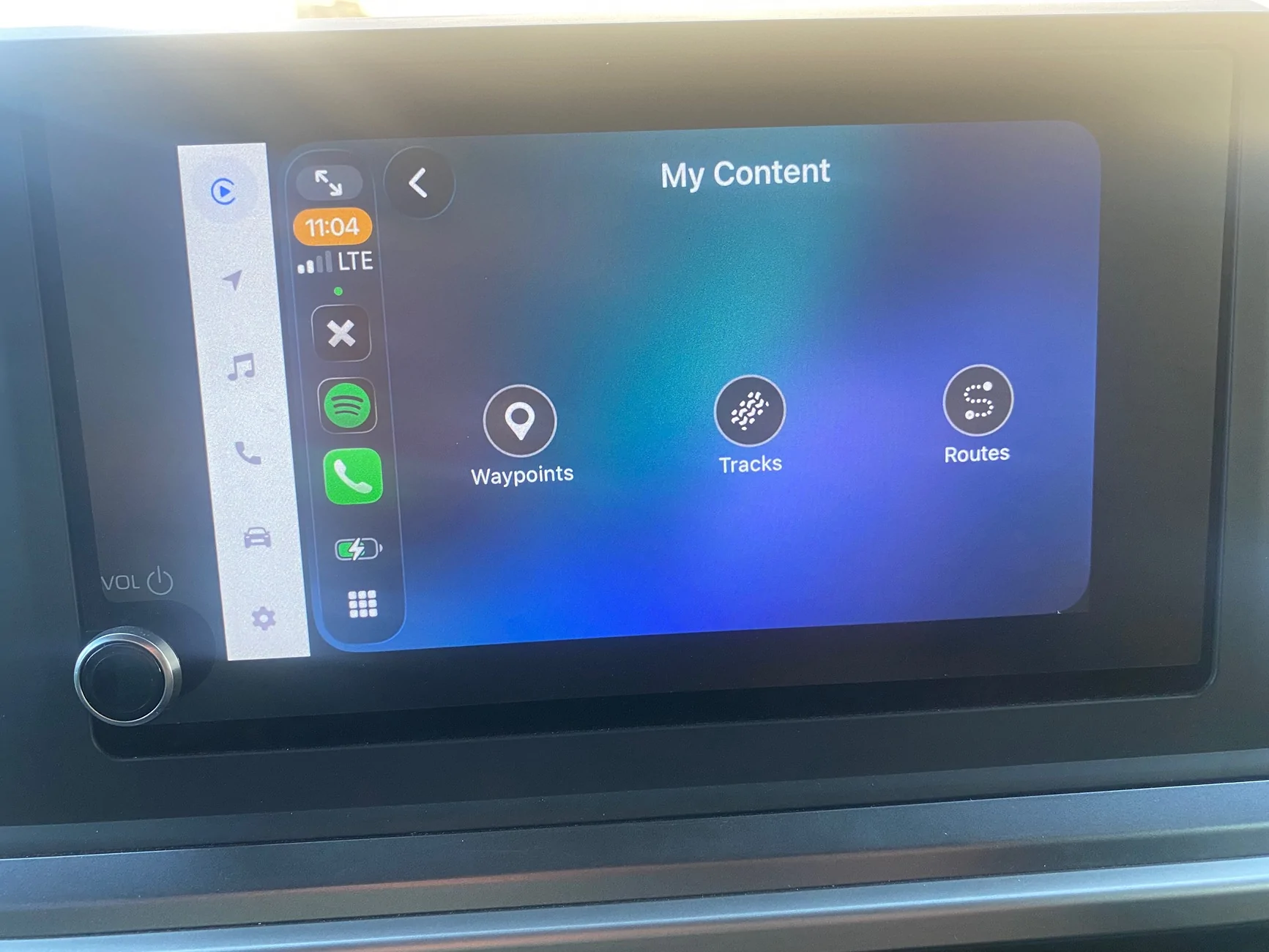
I’m unable to display my saved OnX content on the dash display. The idea is to display saved routes/waypoints etc. I can’t access or display them. I do have the iPhone connected to the port on the display.
2025 2026 4runner 6th gen Can’t Get OnX content to display on dash. IMG_7795
This is what shows when I open OnX on the phone. But none of my files are available to view.
Thx for any help
Sponsored


ScoMay

TRD Pro
Well-known member
Joined
Mar 29, 2025
Threads
0
Messages
95
Reaction score
43
Location
Tennessee
Vehicle(s)
2022 Ram 1500 Rebel
What happens when you tap that diagonal arrow above the amber clock readout? Anything?

And then when you tap “Waypoints” etc? Anything?

(Just guesses on my part. I am nowhere near my Pro.)

Last resort you could contact OnX. There are more than a few newest gen Tacoma and 4Runner owners out there using OnX. OnX may have already dealt with this issue and could have a solution for you.
 

ScoMay

TRD Pro
Well-known member
Joined
Mar 29, 2025
Threads
0
Messages
95
Reaction score
43
Location
Tennessee
Vehicle(s)
2022 Ram 1500 Rebel
It might be easier to diagnose the source of the problem if you were getting nothing, but you are getting something.

Not sure if it is a Toyota issue or a phone issue or an OnX issue. I would start with contacting OnX.
 

MikeD

TRD Off-Road Premium
Well-known member
Joined
Jun 4, 2025
Threads
12
Messages
434
Reaction score
323
Location
Virginia
Vehicle(s)
2025 4Runner TRD Off Road Premium - Heritage Blue Hybrid
I’m unable to display my saved OnX content on the dash display. The idea is to display saved routes/waypoints etc. I can’t access or display them. I do have the iPhone connected to the port on the display.
... none of my files are available to view.
Thx for any help
FWIW I have the same issue. My workaround is to open onX on my phone and make selections there and then they show up on the map on the Android Auto display so I can use them. (not sure if I need to have cell connection or not - I save offline maps for all my off-road waypoints and routes). I've been frustrated with onX integration with Android auto but when it works it is SO valuable.
 

Joestac

Well-known member
Joined
Nov 21, 2025
Threads
17
Messages
487
Reaction score
361
Location
Austin, TX
Vehicle(s)
2025 4Runner Trailhunter
FWIW I have the same issue. My workaround is to open onX on my phone and make selections there and then they show up on the map on the Android Auto display so I can use them. (not sure if I need to have cell connection or not - I save offline maps for all my off-road waypoints and routes). I've been frustrated with onX integration with Android auto but when it works it is SO valuable.
When I was in New Mexico and had OnX running on AA when I got close to something and the cameras automatically kicked on, getting OnX to load right after that was very hit or miss. Mostly miss. I even had the entire regions maps downloaded with the highest detail available.
 

MikeD

TRD Off-Road Premium
Well-known member
Joined
Jun 4, 2025
Threads
12
Messages
434
Reaction score
323
Location
Virginia
Vehicle(s)
2025 4Runner TRD Off Road Premium - Heritage Blue Hybrid
When I was in New Mexico and had OnX running on AA when I got close to something and the cameras automatically kicked on, getting OnX to load right after that was very hit or miss. Mostly miss. I even had the entire regions maps downloaded with the highest detail available.
Ditto. When MTM view kicks in at low speed it is often flaky getting back to onX maps. Seemed to work better this weekend on a trail in TN - I only lost the detailed map after the MTM view transition once - and I was able to click on my phone to get the detailed map view back quickly on the big screen. (It had reverted to showing me all of CONUS on the map) I'm 90% certain these flaws are on onX and its interface to Android Auto - I don't think it has anything to do with Toyota except maybe some ambiguous interrupt message when transitioning screens between MTM and AA? I've also got the Trails Offroad app and I've not noticed the same issue when transitioning from MTM - but I've not used Trails Offroad as much and not at all this weekend because they didn't even have the trail I was on in their map.
 

ScoMay

TRD Pro
Well-known member
Joined
Mar 29, 2025
Threads
0
Messages
95
Reaction score
43
Location
Tennessee
Vehicle(s)
2022 Ram 1500 Rebel
OP is on an iPhone. I agree the problem is probably traced to OnX, but it seems to be affecting BOTH CarPlay and Android Auto.

Maybe a call to OnX is where a solution will be found. Tell them phone model and operating system - that’s what I would suggest.
 

HVLA

TRD Off-Road Premium
Well-known member
Joined
Feb 28, 2025
Threads
9
Messages
622
Reaction score
425
Location
USA
Vehicle(s)
Lexus
I’m unable to display my saved OnX content on the dash display. The idea is to display saved routes/waypoints etc. I can’t access or display them. I do have the iPhone connected to the port on the display.
IMG_7795.webp
This is what shows when I open OnX on the phone. But none of my files are available to view.
Thx for any help
Offline maps saved where specifically? If they arent saved to your phone I would start there first.
 

ScoMay

TRD Pro
Well-known member
Joined
Mar 29, 2025
Threads
0
Messages
95
Reaction score
43
Location
Tennessee
Vehicle(s)
2022 Ram 1500 Rebel
If you are asking about OnX offline maps, they save to your phone and you can select how detailed you want them. More detail takes longer to download and takes up more space.

And, yes, it is a good idea to check that you have them before losing cell service.
 

MikeD

TRD Off-Road Premium
Well-known member
Joined
Jun 4, 2025
Threads
12
Messages
434
Reaction score
323
Location
Virginia
Vehicle(s)
2025 4Runner TRD Off Road Premium - Heritage Blue Hybrid
What is “MTM”?
Sorry. Multi Terrain Monitor. When in 4HI or 4LO when you hit the MTS (Multi-Terrain Select) button on the mode selector dial and are going slow enough (under somewhere around 6 MPH) the screen will switch to the MTM view showing the front and sides (or other selectable views) so you can see obstacles below your view over the hood and the doors. I guessed this is what was being referred to above re: "cameras automatically kicked on" (" had OnX running on AA when I got close to something and the cameras automatically kicked on, getting OnX to load right after that was very hit or miss.'") Going back to AA (or CarPlay, I assume) by pushing the "view" button or speeding up is where onX will sometimes crap out.
 

ScoMay

TRD Pro
Well-known member
Joined
Mar 29, 2025
Threads
0
Messages
95
Reaction score
43
Location
Tennessee
Vehicle(s)
2022 Ram 1500 Rebel
Sorry. Multi Terrain Monitor. When in 4HI or 4LO when you hit the MTS (Multi-Terrain Select) button on the mode selector dial and are going slow enough (under somewhere around 6 MPH) the screen will switch to the MTM view showing the front and sides (or other selectable views) so you can see obstacles below your view over the hood and the doors. I guessed this is what was being referred to above re: "cameras automatically kicked on" (" had OnX running on AA when I got close to something and the cameras automatically kicked on, getting OnX to load right after that was very hit or miss.'") Going back to AA (or CarPlay, I assume) by pushing the "view" button or speeding up is where onX will sometimes crap out.
Thanks! Appreciate the thorough explanation. Now I get it!

Have not had enough opportunities to play with OnX on my Pro’s screen to this point so this thread has me interested in one of the frustrations. I am currently about 1,000 miles away from my vehicle otherwise I would be out there in my driveway trying to help solve OP’s dilemma!
Sponsored


Top