
Sponsored

CarPlay, iPhone and Bluetooth question

sjm1027

Limited
New member
First Name
Steve
Joined
Apr 12, 2026
Threads
1
Messages
3
Reaction score
1
Location
Massachusetts
Vehicle(s)
2015 Highlander
I have two issues with my 2026 4Runner Limited. The issues are with CarPlay, my iPhone, and the 4Runner Radio (XM) connection.
I noticed that when I remote-start the 4Runner, get in, press the brake, and press the start button, CarPlay never connects unless I stop the 4Runner and restart it with the button. It seems to happen all the time, and I am wondering if anyone else has the same issue?

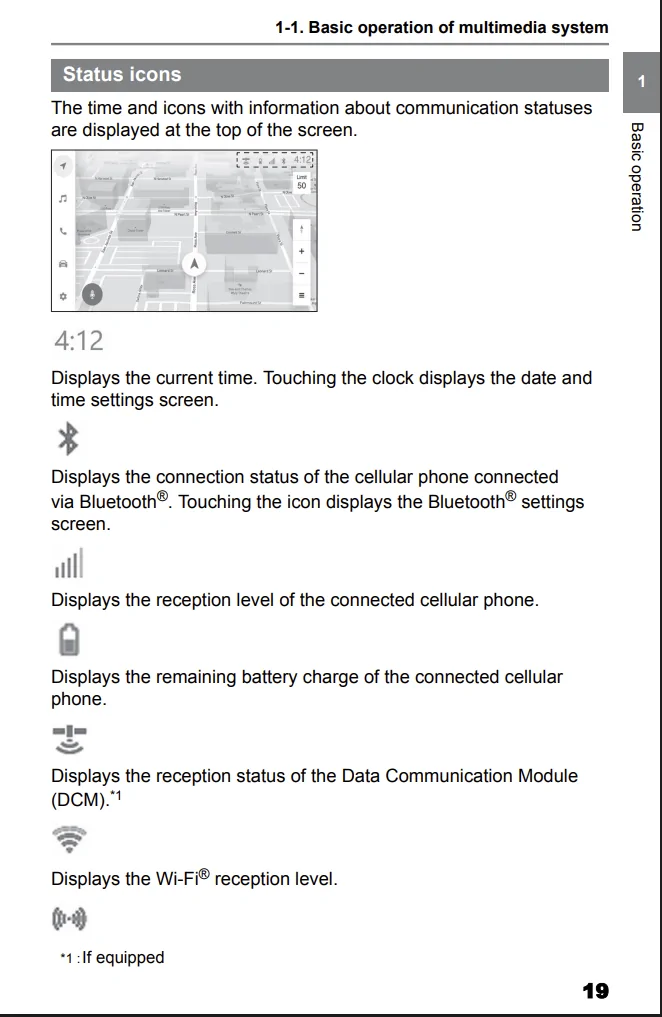
My second issue is that my iPhone is on the Qi charger, and I look at the 14" screen and notice the Qi symbol at the very top is tinted blue, the Wifi symbol is blue, but the Bluetooth symbol is grayed out. I don't think I have ever seen the Bluetooth symbol, a blue signifying it is connected. I also have times where the music Source button, when pushed, shows my iPhone as connected, and when I select Radio, the radio plays for 10 seconds and goes back to iPhone. Does anyone else have this issue? I would think the 4Runner radio would be the default player since Bluetooth is never tinted blue.
Sponsored

 

bancroftdg

TRD Off-Road Premium
Well-known member
First Name
David
Joined
Apr 22, 2025
Threads
7
Messages
105
Reaction score
81
Location
Massachusetts
Vehicle(s)
25 TRD ORP
Regarding remote start from your phone, yes mine does the same thing - no Carplay until I restart. I did remote start with my FOB and Carplay was active when I got in.

Not sure about second issue, I'll have to check. I do note that occasionally while listening to Sirrius, the music stops and I have to hit Source then Radio (it had connected to my Iphone).
 
OP
OP
sjm1027

sjm1027

Limited
New member
First Name
Steve
Joined
Apr 12, 2026
Threads
1
Messages
3
Reaction score
1
Location
Massachusetts
Vehicle(s)
2015 Highlander
To connect my phone via Bluetooth, I have to remove everything first. Right now, the only icon highlighted in blue is the WiFi satellite icon, the one next to Qi. I am afraid of screwing something up, so I don't want to remove everything just to get my Bluetooth connected. It works without, so I suspect the WiFi satellite icon is the connection between my phone and the 4Runner.
 

L-2

Trailhunter
Member
Joined
May 6, 2025
Threads
0
Messages
18
Reaction score
10
Location
Nevada & California
Vehicle(s)
2017 Tacoma Off-Road, 2014 Acura MDX, 2025 4Runner TrailHunter
Wasn't/isn't WIFI an extra-charge subscription service? Maybe I'm confusing WIFI service with some other service which I didn't extend or subscribe to. I don't have a Limited model. I have the Trailhunter, instead, if that makes a difference.
 
OP
OP
sjm1027

sjm1027

Limited
New member
First Name
Steve
Joined
Apr 12, 2026
Threads
1
Messages
3
Reaction score
1
Location
Massachusetts
Vehicle(s)
2015 Highlander
I don't know, I am very confused about how my phone is connected right now. I am just hoping someone will shine a little light on this issue.
 

SteveS

SR5
Member
First Name
Steve
Joined
Mar 24, 2026
Threads
1
Messages
12
Reaction score
4
Location
Puyallup, WA
Vehicle(s)
2026 SR5, 2023 Range Rover Sport
As I understand it it, Apple CarPlay used both BT and a WiFi connection to the car. I believe it initially initiates a BT connection but then WiFi.

I wanted to connect my phone to a dedicated hotspot and use CarPlay wirelessly. It was not possible because CarPlay takes the WiFi connection on your phone.
I use. a cable now which hase bee
 

jimbo285

SR5
Well-known member
First Name
Jim
Joined
Oct 17, 2025
Threads
13
Messages
52
Reaction score
19
Location
Fairbanks
Vehicle(s)
2025 4Runner
I was having problems connecting wireless CarPlay but noticed that my home WiFi was still connected in my driveway. I had to manually disconnect from my home WiFi and connect to the WiFi listed as “smartphone something” and the CarPlay would open. Got tired of doing this and made my home WiFi not auto-join but smartphone something auto-join. Now I only have the occasional failure if I hop out to pump gas or make a quick stop at a store. I just hard reset the power on the radio to cure that one. Quick fix but nothing is perfect
 

Biff

TRD Off-Road Premium
Active member
Joined
Sep 10, 2025
Threads
5
Messages
42
Reaction score
18
Location
Canada
Vehicle(s)
2025 4Runner ORP
I have the same issue connecting to Apple CarPlay after using remote start with the app. When I get in and start driving I always have to hold down the button on the volume knob until the radio starts to reboot. Then it connects to my iPhone for CarPlay. I don’t understand how or why it’s like this!! It is very annoying, especially in the winter months when I need to remote start the truck to warm it up !!
 

Joestac

Well-known member
Joined
Nov 21, 2025
Threads
15
Messages
432
Reaction score
322
Location
Austin, TX
Vehicle(s)
2025 4Runner Trailhunter
Interesting, not a lot of info on the DCM in either the full manual, or the multimedia one. This does give an overview of the icons though.

For the issue of the device not connecting automatically, this is probably just a simple wifi timeout so the system does not always keep searching for a connection.

I get around it on Android Auto by just cycling the wifi on my phone, quicker than holding the power button down on the unit. Then the phone itself attempts to initiate a new connection, which the vehicle answers and AA connects.
Sponsored


Top