

Sponsored
OP
OP
pgrossman

pgrossman

Limited
Member
First Name
Philip
Joined
May 29, 2026
Threads
3
Messages
22
Reaction score
39
Location
Atlanta, GA
Vehicle(s)
2026 4Runner Limited
Following, would be interested in using this app if it would work for SR5 trim
It should work with all Gen 6 vehicles, including Tundras, Tacomas, and Sequoias. Although I can't validate that yet, but I'm going to see if the dealer will let me test it at their location. But all the TNGs should use the same PID code. So it'll work across all forerunners, six gen.
Sponsored

 
OP
OP
pgrossman

pgrossman

Limited
Member
First Name
Philip
Joined
May 29, 2026
Threads
3
Messages
22
Reaction score
39
Location
Atlanta, GA
Vehicle(s)
2026 4Runner Limited
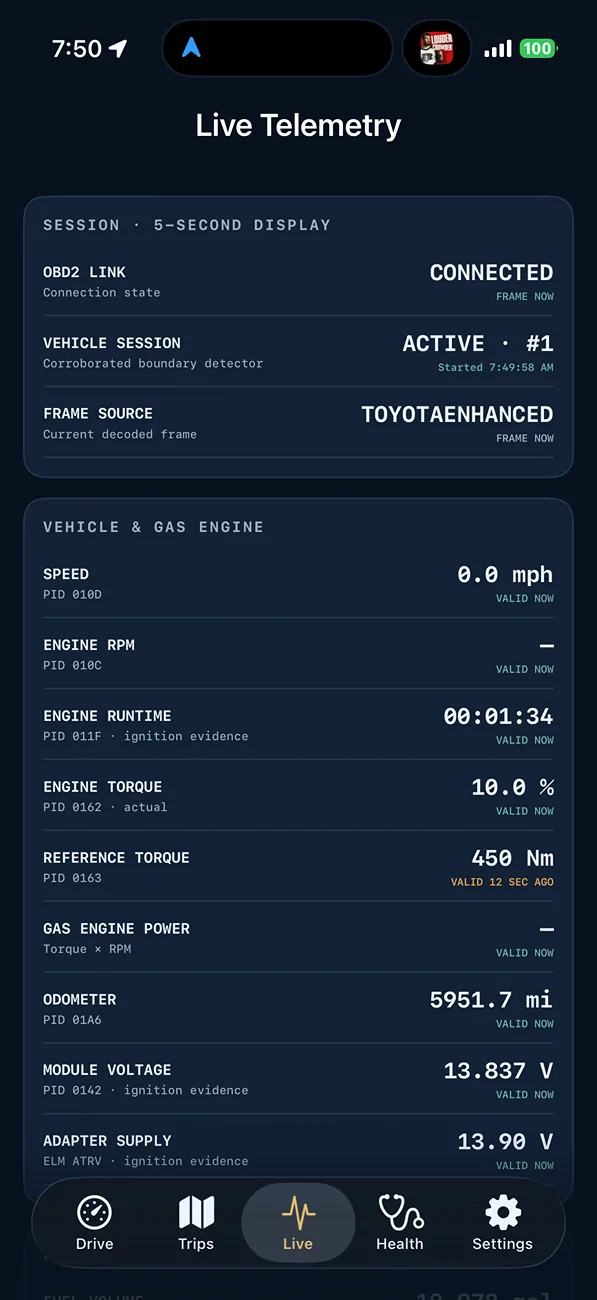
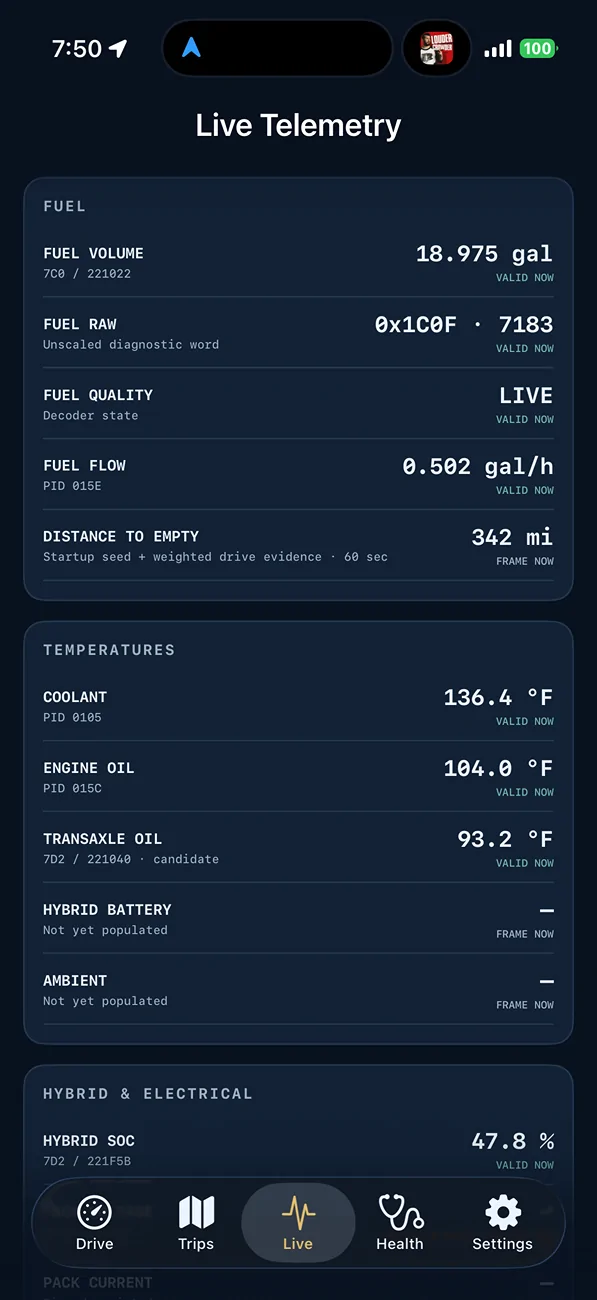
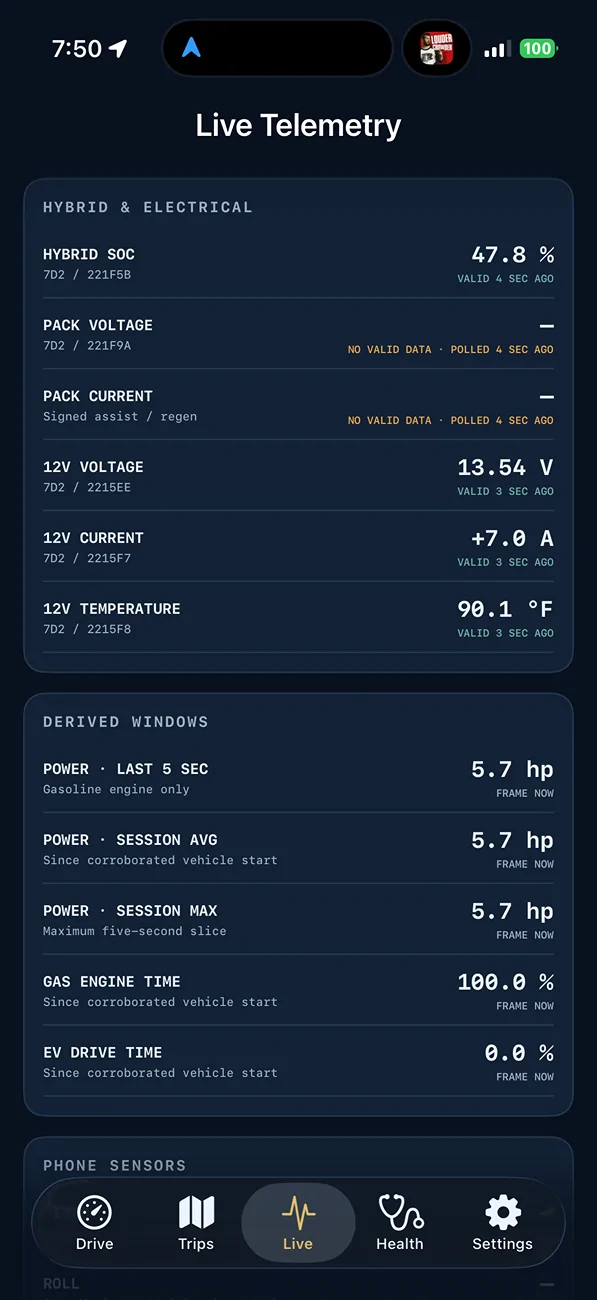
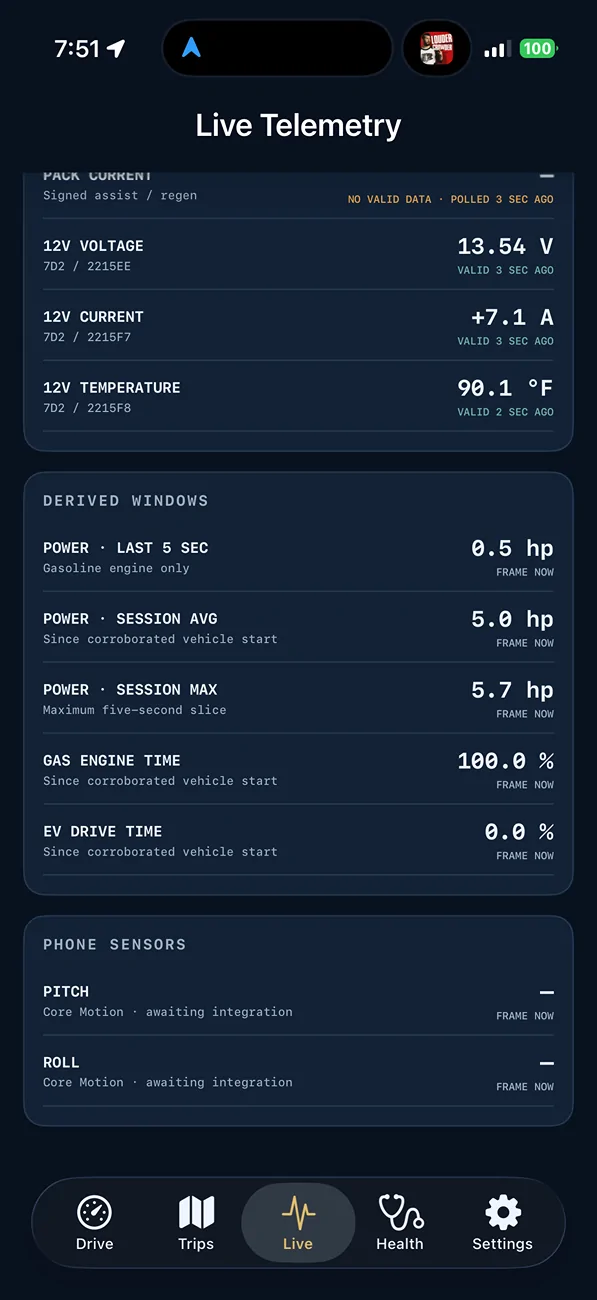
Did a bunch of testing/PID Sniffing last night and here is all the data I can currently capture from the ODB2

I will continue to "sniff" out the other items, right now I am working diligently to find the Roll/Pitch info. At minimum I can use the iOS devices accelerometer and pipe that data into the app. I will b using the Altimeter of the iOS device to capture altitude for the overloading page.

Let me know if there is something missing you would like to have added and I will see what I can do.

For those wanting to help beta test, I will be setting this up with Apples Test flight. I will let everyone know when this is ready and

2025 2026 4runner 6th gen Building iOS App for 6th Gen (fuel, average miles, and other data) IMG_2941


2025 2026 4runner 6th gen Building iOS App for 6th Gen (fuel, average miles, and other data) IMG_2942


2025 2026 4runner 6th gen Building iOS App for 6th Gen (fuel, average miles, and other data) IMG_2943


2025 2026 4runner 6th gen Building iOS App for 6th Gen (fuel, average miles, and other data) IMG_2944
 

TdoubleT

Member
First Name
Tommy
Joined
Jul 19, 2026
Threads
0
Messages
5
Reaction score
0
Location
Canada
Vehicle(s)
5th Gen 4Runner SR5
That’s impressive to say the least. If you have it running on Testflight and you need some to partake, I’m sure you’ll be able to find plenty to help out (including myself) for testing. Cheers and again, fantastic work!
 

Nodak

Platinum
Well-known member
First Name
JR
Joined
Jan 22, 2025
Threads
58
Messages
2,559
Reaction score
1,446
Location
ND
Vehicle(s)
2025 4R Platinum Heritage Blue , 2026 4R Platinum Underground (Pending)
i was going to suggest a torque app pid scan, but you already have a limited and there isnt much difference in a platinum.
 

jarvis

TRD Off-Road Premium
New member
Joined
May 11, 2026
Threads
0
Messages
4
Reaction score
1
Location
US
Vehicle(s)
2026 TRD Off-Road Premium
Also following along, great work so far - this generally interests me - for my own knowledge, the data is coming direct from the bluetooth OBD2 that is only displaying through the app and the app isn't actually 'storing' any data? I'm thinking through this from a Cyber perspective and privacy risk here.
 
OP
OP
pgrossman

pgrossman

Limited
Member
First Name
Philip
Joined
May 29, 2026
Threads
3
Messages
22
Reaction score
39
Location
Atlanta, GA
Vehicle(s)
2026 4Runner Limited
Also following along, great work so far - this generally interests me - for my own knowledge, the data is coming direct from the bluetooth OBD2 that is only displaying through the app and the app isn't actually 'storing' any data? I'm thinking through this from a Cyber perspective and privacy risk here.
Yeah, just displaying the data though I will capture the data for a trip and I’ll have the ability for the user to capture all the data and use it later on. It will be encrypted on the phone and only accessible by that user and exported by that user.
 

MikeD

TRD Off-Road Premium
Well-known member
Joined
Jun 4, 2025
Threads
13
Messages
540
Reaction score
417
Location
Virginia
Vehicle(s)
2025 4Runner TRD Off Road Premium - Heritage Blue Hybrid
I don't know if I’ll have it in the thousands in the final designs,. , although that is the level of detail that the system does provide. I may make that an option in the settings so, individuals can decide accurate they want it to be.

Also, working on a better true distance to empty based on the actual driving at the time
Really great work. Am dreaming about someone taking your code and creating a version for Android Auto. (And I would opt for as much resolution on the fuel levels as possible)

But on your final point: Is there any way to see EXACTLY the algorithm the vehicle is using to calculate distance to empty? I've attempted unsuccessfully to back into the algorithm based on all the data I can collect from the dash - but none of my candidate equations generate repeatable results. Am curious if you find a way to back into the "Toyota" DTE algorithm with more data - am also curious what algorithm you will use to generate a "better true distance to empty based on the actual driving at the time".
This post from me is old and I have lots more data since then, but have given up trying to figure out how Toyota calculates DTE:

Interesting. My data below is based on recording (photo) the DTE before and after fill up over the last 27 fillups and almost 9K miles. When running with air dam and OEM TRD ORP tires I've seen the DTE value after fillup as high as 366 when tank milage was 24.4; with air dam off and 285/70R18 Load E tires on TRD PRO wheels I've seen as low 294 (when tank milage was 15.1 (which included a long off-road excursion). In table below the "blank rows" are where I swapped between wheels & tires.
I DO NOT know exactly how the 6G4R calculates DTE and am interested if anyone KNOWS. (I've checked all the theories and run the equations so I'm really only interested in accurate knowledge if there is a Toyota engineer out there. Thanks

Refuel DateOdometer ReadingAdjusted Odometer (+3.4%)Tank MilesAdj. MilesGallonsFuel OctaneDist. to go -Before fill"Actual" dist to go?Dist. to go -After fillMPG TankGallons (total)MPG TotalRange Est.
7(fuel added)(mileage)
5/24/202526225515.71987?53.2?16.215.7216.7308.2
6/6/202558632415.69989?68.1?20.631.4218.7392.1
6/14/202585426814.193?93.1?1945.5218.8361.1
6/27/2025121636216.073932865.934722.561.5919.7427.9
7/4/2025148727111.76793102166.63472373.3620.3437.6
7/20/2025184836116.83493646.435121.490.1920.5407.4
8/1/2025220735916.33393658.635122106.5320.7417.6
8/7/2025251931216.211932453.735119.2122.7420.5365.7
8/17/2025290738816.505931258.736123.5139.2420.9446.7
8/30/2025328637917.12792.5-241.436122.1156.3721420.4
8/31/2025365737116.81893148.136122.1173.1921.1419.1
9/6/2025400434717.06393-339.435520.3190.2521386.4
9/13/2025436636216.95493-143.735521.4207.221.1405.7
9/19/2025473737116.459931757.336322.5223.6621.2428.3
9/20/202549061696.93893214293.836624.4230.621.3462.8
285/70 no air dam
9/24/202552115221.4305315.416.35593105134819.3246.9621.1356
######54815501270279.415.547933162.133018262.521332.1
9/28/202557605789.7279288.715.345933568.832418.8277.8520.8347.8
######60656105.3305315.617.27793-831.531618.3295.1220.7336.5
10/10/202562606307.1195201.810.5593125161.631419.1305.6720.6356.6
10/11/202565576614.5297307.317.02493-935.730618.1322.720.5332.7
10/18/202568006865.9243251.514.602934675.730217.2337.320.4318.7
######69206990.1120124.28.23493167162.429415.1345.5320.2282.4
265/70 & Air Dam
10/31/202573077377.138738716.274931364.832423.8361.8120.4451.8
10/31/202576307700.132332316.52593748.432419.5378.3320.4371.4
11/2/202579167986.128628615.041937610133220.4393.3720.3387
11/7/202581338203.12172178.50993155267.533525.5401.8820.4484.5
11/8/202584438513.131031015.324933174.433420.2417.2120.4384.4
285/70 no air dam
11/14/202587718841.1328339.416.284931056.633520.8433.4920.4384.6
11/21/202589889058.1217224.611.75393106138.532919.1445.2420.3355.5
11/23/202592629332.1274283.516.99893-733.431116.7462.2420.2307.4

Currently I have the 285/70s on the TRD flat black option wheels (+45 offset). Will be moving back to the OEM 265/70 Michelins on TRD PRO wheels (+20 offset) for long trips - to get the range and avoid stops. I like the all black look of both wheels and this solution avoids some of the rubbing on the 285s which will be on for off-roading and when snow expected where I will be. (Handed down the OEM wheels to my son and now have his 2022 SR5 Premium 17x7 alloy wheels and tires available if anyone interested:>)
 
OP
OP
pgrossman

pgrossman

Limited
Member
First Name
Philip
Joined
May 29, 2026
Threads
3
Messages
22
Reaction score
39
Location
Atlanta, GA
Vehicle(s)
2026 4Runner Limited
Really great work. Am dreaming about someone taking your code and creating a version for Android Auto. (And I would opt for as much resolution on the fuel levels as possible)

But on your final point: Is there any way to see EXACTLY the algorithm the vehicle is using to calculate distance to empty? I've attempted unsuccessfully to back into the algorithm based on all the data I can collect from the dash - but none of my candidate equations generate repeatable results. Am curious if you find a way to back into the "Toyota" DTE algorithm with more data - am also curious what algorithm you will use to generate a "better true distance to empty based on the actual driving at the time".
This post from me is old and I have lots more data since then, but have given up trying to figure out how Toyota calculates DTE:
I'm not sure how Toyota does it. It's a mystery to me. But what I'm going to be doing is a one-minute running average based on the fuel flow and the total fuel in the tank and then also taking into account the EV portion of it so that over any one minute in time you'll have a fairly accurate distance to empty. Obviously if you accelerate past a truck or something, I didn't want it to shoot up and shoot down, so I'm trying to give a running average over the period of time,
 
OP
OP
pgrossman

pgrossman

Limited
Member
First Name
Philip
Joined
May 29, 2026
Threads
3
Messages
22
Reaction score
39
Location
Atlanta, GA
Vehicle(s)
2026 4Runner Limited
I’m getting ready to begin real-world beta testing for MobileCommandISR,

I’m looking for Toyota owners willing to help test the app with their vehicles and Bluetooth OBD-II adapters.

A sincere thank-you to everyone who volunteers. Your interest and willingness to help mean a lot.

I won’t be able to include everyone in the initial beta group. Please don’t take it personally if you aren’t selected. I need to build a balanced testing group covering different Toyota models, model years, generations, powertrains, and Bluetooth adapters. Selection will be based on creating the most useful mix—not on who volunteered first or who has the newest vehicle.

I’m Initially focused on 6th Gen (and 5th Gen)
  • Tacoma
  • 4Runner
  • Sequoia
  • Land Cruiser
  • Tundra
  • Other potentially useful Toyota configurations
If you’re interested, please complete the short form below:

Beta Tester Form

Even if you aren’t selected for the first round, I may contact you for a later testing phase as the app expands. Thank you again for helping me make MobileCommandISR accurate, reliable, and useful in the real world.
 

SC4Runner

TRD Off-Road Premium
Well-known member
First Name
Fred
Joined
Mar 28, 2025
Threads
6
Messages
228
Reaction score
203
Location
South Carolina
Vehicle(s)
Toyota 4Runner, GMC Truck, Mercury Grand Marquis
I filled out the form and looking forward to chipping in! The information you are gathering and the layout you are providing shows a lot of potential.
 

Kurtz48

Platinum
Member
First Name
Patrick
Joined
Dec 29, 2025
Threads
1
Messages
5
Reaction score
8
Location
Charlotte, NC
Vehicle(s)
2010 Toyota Sienna Limited (soon to be 4Runner Platinum!)
Filled out the form. I don't currently have a Bluetooth OBD-II adapter. Is there one anyone is willing to recommend?
 
OP
OP
pgrossman

pgrossman

Limited
Member
First Name
Philip
Joined
May 29, 2026
Threads
3
Messages
22
Reaction score
39
Location
Atlanta, GA
Vehicle(s)
2026 4Runner Limited
Filled out the form. I don't currently have a Bluetooth OBD-II adapter. Is there one anyone is willing to recommend?
I currently use the Vgate vLinker MC+ in my research, as I started looking at building this app, that one came out as having the most information available. I don't know how much different it is than any of the other ones, but this is a list that I sort of have currently that we're going to be looking at.

Recommended Bluetooth OBD-II adapters for MobileCommandISR, in order:

  1. Vgate vLinker MC+ — Our preferred adapter and the only one fully tested with MobileCommandISR on the sixth-generation 4Runner. It reliably supports Toyota-specific enhanced PID requests, firmware updates, automatic sleep/wake, and long diagnostic commands. Limitation: its 2 KB buffer can overflow during unrestricted passive CAN monitoring, although normal MobileCommandISR polling works well.
  2. OBDLink CX — Best premium BLE alternative. Excellent connection quality, Bluetooth 5.1 LE, raw-CAN support, firmware updates, and very low sleep power. Limitation: not yet physically validated with MobileCommandISR, and it is more expensive than most generic adapters.
  3. Veepeak OBDCheck BLE+ Plus — Excellent value. It uses ELM327 v2.2, supports additional AT commands, works with iPhone/iPad over BLE, and has broad third-party-app support. Limitation: no MS-CAN or SW-CAN support and not yet tested directly with MobileCommandISR.
  4. Vgate vLinker FD+ — A capable vLinker-family alternative supporting iOS BLE, ELM and ST commands, raw CAN, and MS-CAN. Limitation: it is primarily optimized for Ford/FORScan applications, so many of its extras provide little benefit on a Toyota. Despite the name, its published specifications do not list CAN FD support.
  5. Vgate iCar Pro BLE 4.0 — Good budget choice with iOS BLE, all standard OBD-II protocols, firmware updates, and automatic sleep/wake. Limitation: it is an older, lower-throughput design than the vLinker MC+, making it less desirable for rapid multi-PID telemetry.
  6. Carista EVO — Well-built current-generation Bluetooth adapter with Toyota support, good power management, and strong diagnostic capabilities in the Carista ecosystem. Limitation: Carista’s documentation focuses primarily on its own app, so direct MobileCommandISR compatibility still needs verification.

    I would not currently recommend app-locked adapters such as BlueDriver. I would also exclude the otherwise excellent OBDLink MX+ because it uses Bluetooth 3.0 rather than BLE
 

Nodak

Platinum
Well-known member
First Name
JR
Joined
Jan 22, 2025
Threads
58
Messages
2,559
Reaction score
1,446
Location
ND
Vehicle(s)
2025 4R Platinum Heritage Blue , 2026 4R Platinum Underground (Pending)
from what i read, you dont want to use a BLE adapter, it has slower tranmits for real time updates.

roughly 30 updates/sec vs 100 for non ble adapters.
 
OP
OP
pgrossman

pgrossman

Limited
Member
First Name
Philip
Joined
May 29, 2026
Threads
3
Messages
22
Reaction score
39
Location
Atlanta, GA
Vehicle(s)
2026 4Runner Limited
from what i read, you dont want to use a BLE adapter, it has slower tranmits for real time updates.

roughly 30 updates/sec vs 100 for non ble adapters.
That’s a fair concern, but the 30-versus-100 figure isn’t a general BLE limitation. Some inexpensive BLE adapters are slow, but good BLE adapters can transmit much faster. The actual update rate also depends on the vehicle, ECU response time, number of requested PIDs, adapter firmware, and how the app schedules requests.

The Vgate vLinker MC+ is specifically designed for higher-volume diagnostic and dashboard applications. It supports a 500-kbps internal UART, long diagnostic requests, user-defined commands, and firmware updates. More importantly, 1 have tested it extensively with MobileCommandISR on the actual 4Runner, including Toyota-specific enhanced data, and BLE has not been the limiting factor.

MobileCommandISR also does not need 100 complete updates per second. Trip data is recorded at approximately 1 Hz, and the displayed information is divided among several telemetry channels. A reliable 20–30 complete PID responses per second would already provide more than enough data for this type of dashboard.

I did find one real limitation: the MC+ has a 2 KB buffer and can report BUFFER FULL when attempting unrestricted full-bus passive CAN monitoring. That matters for engineering-level CAN sniffing, but it has not been a problem for MobileCommandISR’s normal targeted polling.

So I would agree that adapter speed matters, but I would not rule out BLE categorically. For an iPhone app, BLE provides reliable CoreBluetooth connectivity, automatic reconnection, low power consumption, and continued Wi-Fi/cellular availability. Based on our physical testing, the vLinker MC+ remains our preferred adapter unless another model proves measurably better in the actual app and vehicle.
Sponsored


Top