
Sponsored
2025 / 2026 4Runner Search: Available Inventory Allocations List - MSRP vs List Price, VIN, ETA, Ship Status, Dealers, Hold Status

- First Name
- Austin
- Joined
- Aug 1, 2025
- Threads
- 0
- Messages
- 2
- Reaction score
- 2
- Location
- United States
- Vehicle(s)
- 2024 Chevrolet 1500 RST 3.0 Duramax/Getting a 6th Gen Soon!
Anyone know how to filter it down better? or is there a command? I.e : Just TRD ORP and without a sunroof?
Yes, in Excel select the entire sheet and then select the Data tab, and Filter symbol to enable filtering on the column headings.Anyone know how to filter it down better? or is there a command? I.e : Just TRD ORP and without a sunroof?
Then on the "Model" column drop down select any "TRD Off-Road Premium ..." selection , and on the "Options" column drop down click on "Text Filters" --> "Does not contain" and use the word "Moonroof"
- First Name
- Austin
- Joined
- Aug 1, 2025
- Threads
- 0
- Messages
- 2
- Reaction score
- 2
- Location
- United States
- Vehicle(s)
- 2024 Chevrolet 1500 RST 3.0 Duramax/Getting a 6th Gen Soon!
You're a lifesaver. Thank you!Yes, in Excel select the entire sheet and then select the Data tab, and Filter symbol to enable filtering on the column headings.
Then on the "Model" column drop down select just the "TRD Off-Road Premium ..." , and on the "Options" column drop down click on "Text Filters" --> "Does not contain" and use the word "Moonroof"
Note: In the "Model" column drop down select any line with "TRD Off-Road Premium ..." in it as I don't know if those are only PT4WD or if they can be other drivetrains (i.e. may be more than one line with "TRD Off-Road Premium" in it)You're a lifesaver. Thank you!

These spreadsheets have helped me so much in locating a Platinum. I'm in NH and the dealerships close by have not had any allocations since March when I originally put a deposit down. Finally got tired of waiting and broadened my search. I had a deposit on one that should be arriving 8/8-8/17 and I believe just got into port today (8/5) outside of Pittsburgh, PA, but I ended up finding yet another one in GA that was already at the dealership and willing to sell out of state. So, if you're looking for a Wind Chill Pearl Platinum 4Runner in PA, I just called Cochran Toyota and gave up my hold on one that should be there soon!
Put some serious miles on the car driving from GA to NH, but it was a great drive!
Put some serious miles on the car driving from GA to NH, but it was a great drive!
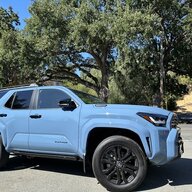
These spreadsheets have helped me so much in locating a Platinum. I'm in NH and the dealerships close by have not had any allocations since March when I originally put a deposit down. Finally got tired of waiting and broadened my search. I had a deposit on one that should be arriving 8/8-8/17 and I believe just got into port today (8/5) outside of Pittsburgh, PA, but I ended up finding yet another one in GA that was already at the dealership and willing to sell out of state. So, if you're looking for a Wind Chill Pearl Platinum 4Runner in PA, I just called Cochran Toyota and gave up my hold on one that should be there soon!
Put some serious miles on the car driving from GA to NH, but it was a great drive!
Same here. Helped me locate my Platinum. The people on this forum are straight-up amazing!
I have used the sheet to locate my Everest ORP and I have been eagerly checking every few days and checking my dealers site. Last week the dealer went from Build Phase to In Transit and the sheet said Port to Dealer.... but today I check and the dealer now shows Build Phase and the sheet shows Factory to Port again with no estimated delivery date.
I did call my dealer last week to see if it was actually at the port and the salesman said yes. But now I do not know what to believe! Is it possible for the status to back to Build Phase if Port Installed Options are being installed?
I did call my dealer last week to see if it was actually at the port and the salesman said yes. But now I do not know what to believe! Is it possible for the status to back to Build Phase if Port Installed Options are being installed?
Yeah, that is weird.I have used the sheet to locate my Everest ORP and I have been eagerly checking every few days and checking my dealers site. Last week the dealer went from Build Phase to In Transit and the sheet said Port to Dealer.... but today I check and the dealer now shows Build Phase and the sheet shows Factory to Port again with no estimated delivery date.
I did call my dealer last week to see if it was actually at the port and the salesman said yes. But now I do not know what to believe! Is it possible for the status to back to Build Phase if Port Installed Options are being installed?
"Factory to port" - Allocated, or in production, or on the ship, or sitting at the port
"Port to dealer" - Checked in at the port and in the process of moving from the port to the dealership lot.
So it's most likely at the port still and I'm guessing they either missed installing something at the port, or it got held up for that QC hold issue.
I really hope that is the case!Yeah, that is weird.
"Factory to port" - Allocated, or in production, or on the ship, or sitting at the port
"Port to dealer" - Checked in at the port and in the process of moving from the port to the dealership lot.
So it's most likely at the port still and I'm guessing they either missed installing something at the port, or it got held up for that QC hold issue.
Here is the Vin but I will check its status in the morning and see what it says: JTEVA5BR7S5040203

- Joined
- Apr 9, 2025
- Threads
- 0
- Messages
- 44
- Reaction score
- 17
- Location
- Sacramento, CA
- Vehicle(s)
- 2025 4Runner
Hi, Is there a list of allocations for 2025 Lexus GX550?
Not currently. I have done some rough tests of Lexus allocation spreadsheet runs but have not fully formalized it yet.Hi, Is there a list of allocations for 2025 Lexus GX550?
Looks like the ETA dates have reappeared and the shipping status is Port to DealerI really hope that is the case!
Here is the Vin but I will check its status in the morning and see what it says: JTEVA5BR7S5040203
Port to dealer 8/30/2025 9/20/2025 JTEVA5BR7S5040203

- Joined
- Jul 29, 2025
- Threads
- 0
- Messages
- 3
- Reaction score
- 0
- Location
- Central NY
- Vehicle(s)
- 2022 4runner SR5 Premium
This is an incredible resource. Thank you for all the work you've done on it. I read all 22 pages to see if it has been asked, but is it possible to break out the Options into separate columns. I may be one of the odd ones, but I care less about trim and color. I want the Tow Tech Package with the Hybrid. I can save the spreadsheet as a separate file and break it down, but new ones are being added, it would be time consuming.
So the Options in a cell are ordered case insensitive ascending order. Each option has a "| " preceding it (except the very first one) and a " " at the end of it (except the very last one).This is an incredible resource. Thank you for all the work you've done on it. I read all 22 pages to see if it has been asked, but is it possible to break out the Options into separate columns. I may be one of the odd ones, but I care less about trim and color. I want the Tow Tech Package with the Hybrid. I can save the spreadsheet as a separate file and break it down, but new ones are being added, it would be time consuming.
For example:
50 State Emissions | All Weather Cargo Mat | All Weather Floor Liners | Badge Inserts: Matte Black | Cross Bars | Illuminated Front Emblem: Dark Chrome | Moonroof | Prewired Auxiliary Switches | Rear Cargo Lamp | Tow Tech Package | TRD OFF-ROAD Premium Package
Note that currently "50 State Emissions" is always an included option.
So after selecting the entire sheet and then selecting Data --> Filter , in the Options drop down select Text Filter --> contains
and then fill out the dialog box with the option you want to see. The text filter is a pattern matching filter where you can use * and ? to match multiple characters or a single character which allows you to specify multiple options by using the * between options. Or if you are only looking for 2 options then use the OR field and the second option.
Note that you can always add a column and use the string contains and And operators as well.
So in your case you simply want to look for a "Tow Tech Package", so just enter "| Tow Tech Package" in the text. Note that 50 State Emissions is always in any of the options so based on that you know any option other than that , and that is after that, that you are looking for has a "| " in front of it.
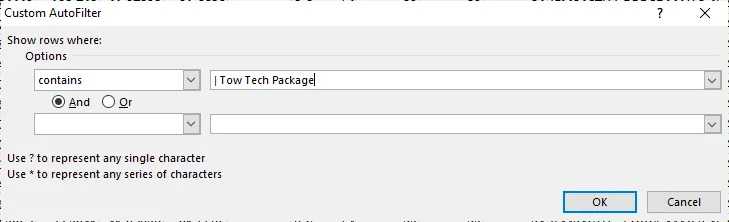
If you wanted to look for something that has the options Cross Bars , Moonroof and Tow Tech Package you could use
"| Cross Bars *| Moonroof *| Tow Tech Package" as the text string to look for. Note the order is important due to the case insensitive ascending ordering of the options.
I have seen a few odd options where the text of an option also appears as the starting text of another option so those can be a bit tricky filtering on using the above, in which case add a column and then use string contains and And operator to produce a boolean result that you can filter on.
Edited: So, when it is possible for an option to have its text appear at the start of another option, a fairly rare possibility, the fool proof method is to add a column and then use the formula as follows where say you wanted to search for a car that has both Tow Tech Package and Cross Bars :
=NOT(OR(ISERR(SEARCH("| Tow Tech Package |", CONCATENATE("| ", optionCellRef, " | "))), ISERR(SEARCH("| Cross Bars |", CONCATENATE("| ", optionCellRef, " | "))))) and then filter on TRUE on that new column.
Sponsored
Last edited:
Similar threads

- Sticky
- Replies
- 164
- Views
- 119,362

- Replies
- 53
- Views
- 23,019


- Replies
- 41
- Views
- 19,299