Sponsored

Move Radio Station Favorites

JasonNewYork

SR5
Active member
First Name
Jason
Joined
Jul 7, 2025
Threads
5
Messages
38
Reaction score
22
Location
Franklin Square, NY
Vehicle(s)
Honda CRV
I attempted to re-arrange my radio station favorites yesterday. I was unable to figure it out. Is this possible on an SR5 radio?
Sponsored


 

Timmybung

Trailhunter
Well-known member
First Name
Timothy
Joined
Jun 16, 2025
Threads
5
Messages
65
Reaction score
81
Location
NH
Vehicle(s)
2025 Toyota 4Runner Trailhunter
I wanted to do this to have them in numerical order; I needed to delete them all and re-favorite them in the order I wanted them to appear
 
OP
OP

JasonNewYork

SR5
Active member
First Name
Jason
Joined
Jul 7, 2025
Threads
5
Messages
38
Reaction score
22
Location
Franklin Square, NY
Vehicle(s)
Honda CRV
I wanted to do this to have them in numerical order; I needed to delete them all and re-favorite them in the order I wanted them to appear
That sucks. I was hoping someone knew how to move them around w/o deleting. What do all of you do on your 4Runners?
 

127.0.0.1

SR5
Well-known member
Joined
Oct 9, 2025
Threads
2
Messages
496
Reaction score
393
Location
earf
Vehicle(s)
a bunch of Toyotas
nope, I've tried.

the only thing that works is erase them all and build them in the order you want.
moving them should be possible but ...nope.

if you find I way somehow I'd like to know how

EDIT: I tried what was posted in this thread and it works

(a) be stopped, so you can access Favorites and EDIT the list

(b) long press on a station until it blinks once, now you can
drag it up or down the list to a new position


it was the long press I was missing.
 
Last edited:

bakutheleo

TRD Off-Road Premium
Well-known member
First Name
Andy
Joined
Jun 8, 2025
Threads
0
Messages
274
Reaction score
128
Location
CA
Vehicle(s)
2025 4Runner i-Force Max
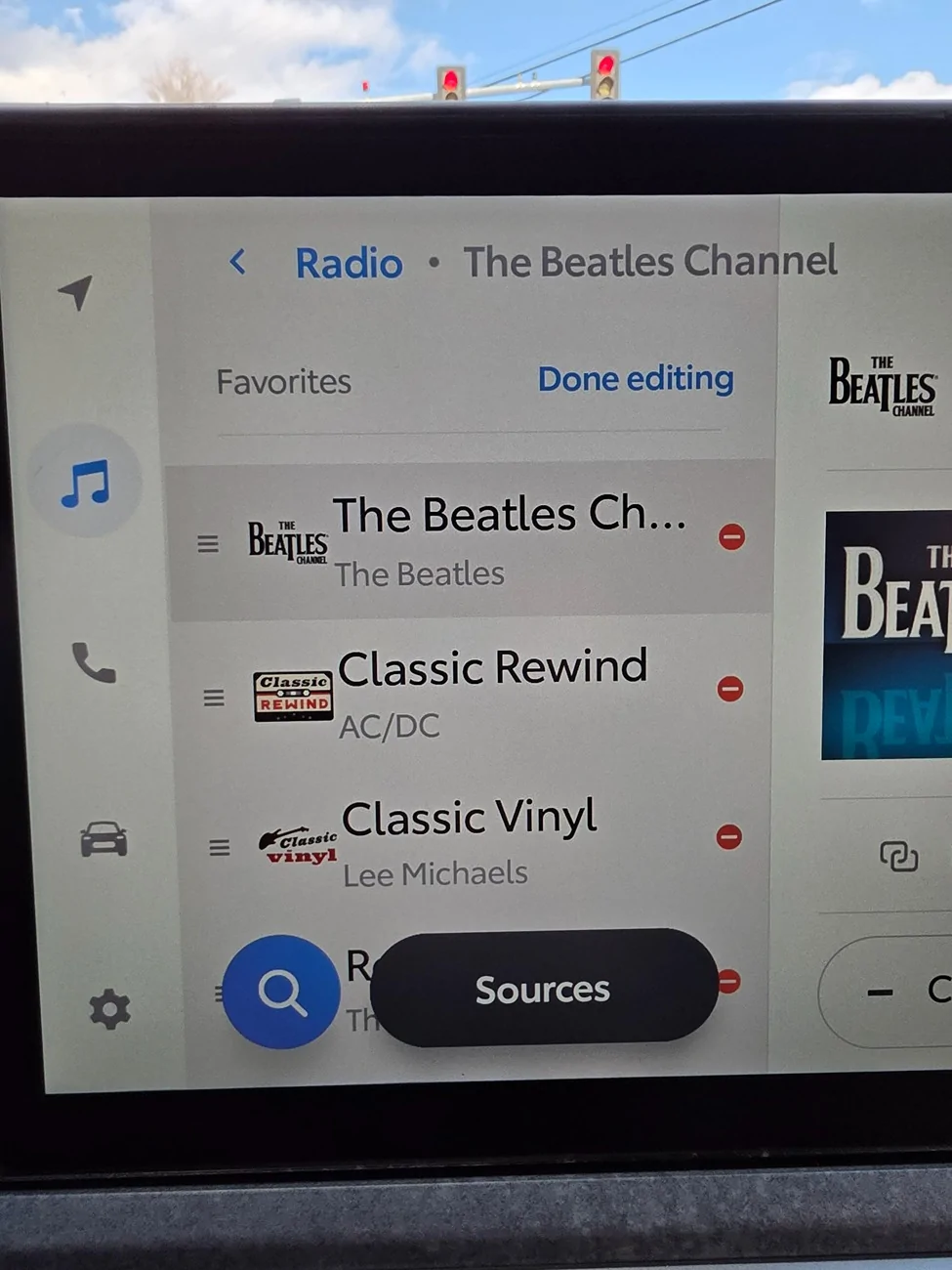
Maybe different on the small screen models...on my ORP hybrid it is easy. There is an "Edit" at the top of favorites, then you just drag the 3-horizontal line handle on the left and move it wherever you want. Is that not on the smaller screen models?
 

lb1606

SR5
Member
Joined
May 14, 2025
Threads
0
Messages
21
Reaction score
1
Location
FL
Vehicle(s)
2025 Toyota 4Runner
Maybe different on the small screen models...on my ORP hybrid it is easy. There is an "Edit" at the top of favorites, then you just drag the 3-horizontal line handle on the left and move it wherever you want. Is that not on the smaller screen models?
Same on the smaller screen models, that was how I did it on my SR5
 

127.0.0.1

SR5
Well-known member
Joined
Oct 9, 2025
Threads
2
Messages
496
Reaction score
393
Location
earf
Vehicle(s)
a bunch of Toyotas
I was wrong and on SR5 you can change the list order

be stopped so the edit function is available
go to Favorites and EDIT

press on a station and hold it until it blinks once
now it can be dragged up or down the list to a new slot
 
OP
OP

JasonNewYork

SR5
Active member
First Name
Jason
Joined
Jul 7, 2025
Threads
5
Messages
38
Reaction score
22
Location
Franklin Square, NY
Vehicle(s)
Honda CRV
I was wrong and on SR5 you can change the list order

be stopped so the edit function is available
go to Favorites and EDIT

press on a station and hold it until it blinks once
now it can be dragged up or down the list to a new slot
I will have to try this on my lunch break today. Thanks! It was driving me crazy.
 

Timmybung

Trailhunter
Well-known member
First Name
Timothy
Joined
Jun 16, 2025
Threads
5
Messages
65
Reaction score
81
Location
NH
Vehicle(s)
2025 Toyota 4Runner Trailhunter
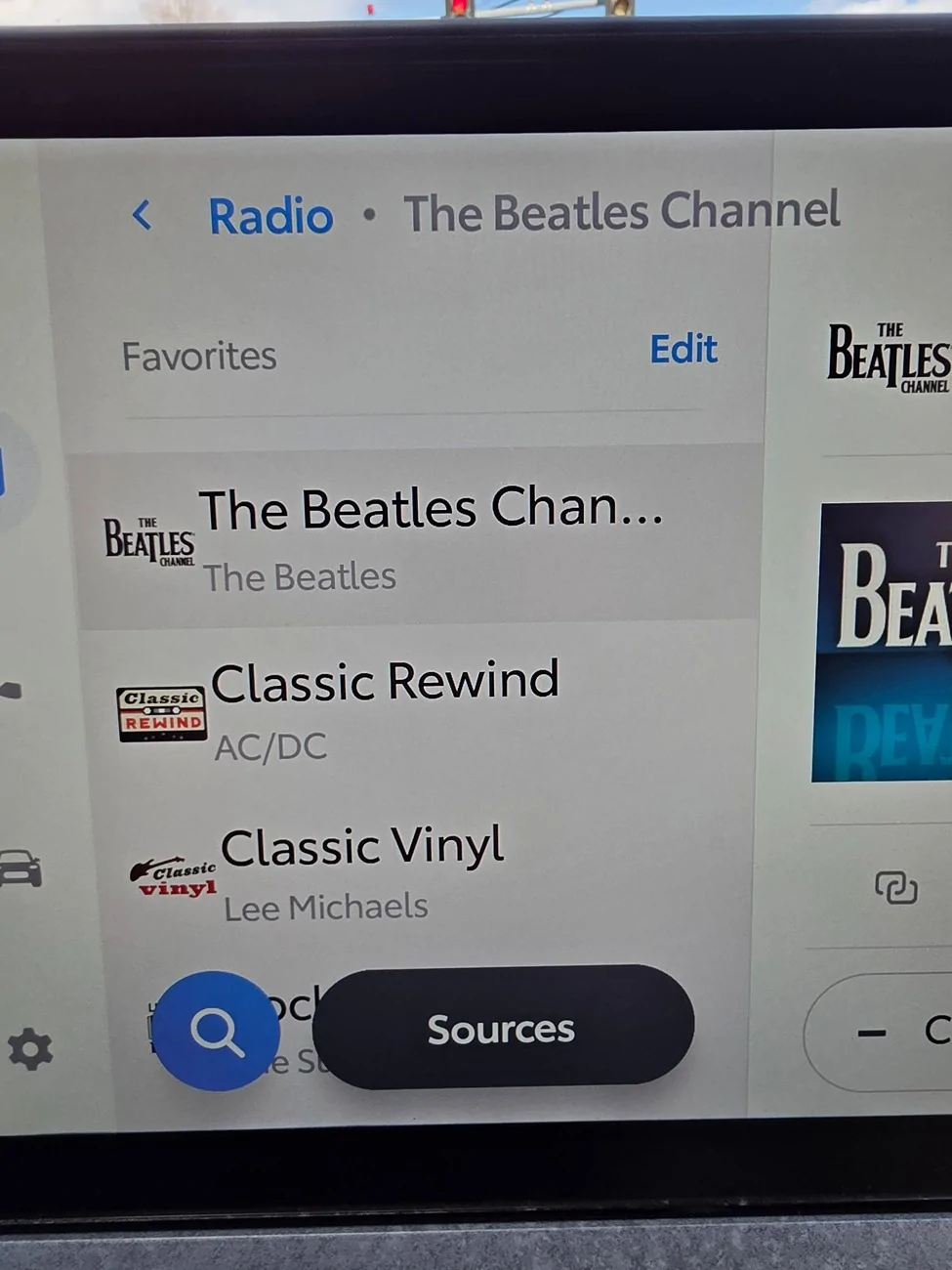
So it turns out I was totally wrong (or they changed something). Turns out as long as you are stopped you can press Edit and then use the three lines on the left (hamburger) to drag the stations up and down to reorder them.
As others pointed out it's totally possible.
2025 2026 4runner 6th gen Move Radio Station Favorites 3059
2025 2026 4runner 6th gen Move Radio Station Favorites 3060
 
Last edited:

Desert_6Gen

TRD Off-Road Premium
Well-known member
First Name
Eric
Joined
Feb 6, 2025
Threads
4
Messages
71
Reaction score
21
Location
Arizona
Vehicle(s)
Bronco
what annoys me more than anything is the font is so big you can fit 2 more preset station on the screen. And that magnifying glass/source button is so big it takes up the entire bottom row, covering up a station. It's so annoying, I can't even move or remove them.
 

127.0.0.1

SR5
Well-known member
Joined
Oct 9, 2025
Threads
2
Messages
496
Reaction score
393
Location
earf
Vehicle(s)
a bunch of Toyotas
on mine the hamburger doesn't do anything but show up. I need to press and hold
the station icon and not the hamburger to do anything. hamburger tap, hamburger press,
hamburger drag, nothing. the remove (do not enter icon) button works to remove favorite
 

Nodak

Platinum
Well-known member
First Name
JR
Joined
Jan 22, 2025
Threads
38
Messages
2,100
Reaction score
1,185
Location
ND
Vehicle(s)
2025 4R Platinum Heritage Blue , 2023 Tundra Platinum Blueprint no-HV
what annoys me more than anything is the font is so big you can fit 2 more preset station on the screen. And that magnifying glass/source button is so big it takes up the entire bottom row, covering up a station. It's so annoying, I can't even move or remove them.
its so when you wear gloves its easier to tap. that was a big deal for me in ND during the winters on my 2014, i am guessing it carried over for UI/UX useability.
 
Last edited:

Vincenzo

TRD Sport Premium
Well-known member
Joined
Mar 27, 2025
Threads
7
Messages
319
Reaction score
219
Location
Southeast
Vehicle(s)
Toyota
If it was only possible to get rid of that annoying magnifier and sources buttons and move them someplace else
Sponsored


Top