Sponsored

Anyone tried this Anytime front bumper camera on SR5?

bkw777

SR5
Well-known member
First Name
Brian
Joined
Jul 31, 2025
Threads
12
Messages
184
Reaction score
91
Location
NJ
Vehicle(s)
25 SR5, 96 SR5
I want a front bumper parking cam but don't want a 2nd screen like wolfbox or all the other add-a-cam kits.

This looks like a good option because it appears to feed into the console screen by tapping & switching the existing backup cam feed, and adding something to switch the camera view on any time instead of just in reverse.

Sounds, almost perfect. I only want the front bumper view once in a while so it's fine that I'd need to flip a switch to get it.

https://www.4runnerlifestyle.com/products/anytime-backup-camera?variant=42308495540469

Anyone tried it yet? Does it actually work? Claims to support 2025 4runner.
Sponsored

 
OP
OP

bkw777

SR5
Well-known member
First Name
Brian
Joined
Jul 31, 2025
Threads
12
Messages
184
Reaction score
91
Location
NJ
Vehicle(s)
25 SR5, 96 SR5
Looking more, the included switch doesn't look like it fits any blanks on 2025.
However they do have a new switch that looks right:
https://www.anytimebackupcamera.com/products/camera-switch-new-square-style

And they do have a harness kit that uses it to just make a simple anytime-rear:
https://www.anytimebackupcamera.com/products/untitled-jan7_08-03

Unlike the other switch which does 2 functions, on/off and front/back, this looks like a single-function.

I emailed them to see if there is any combination of harnesses and parts that could use just the new switch to make an "anytime-front" and let the rear just be normal in reverse only.

Also would like a kit with no camera so I could use one that has radar sensors and a beeper like this:
https://www.amazon.com/Polarlander-Waterproof-Parking-Camerawith-Detector/dp/B07Y236QYW

I asked about that too. If not an existing kit, maybe they do still have all the necessary harnesses and parts just seperately.

Maybe the 2024+ anytime-rear kit
https://www.anytimebackupcamera.com/products/untitled-jan7_08-03
Plus the video switch
https://www.anytimebackupcamera.com/products/switching-relay?variant=21505209598030
Plus the video harness
https://www.anytimebackupcamera.com/products/video-harness-24-wire-harness?variant=32383498387534

Depends what the switch actually does in the main harness. IF it supplies 12v to turn on the rear camera, then it should be possible to just tap the same output from the switch to also power the front camera and switch the relay, So when it's off, the front vcamera (and it's sensors and beeper) lose power, and the relay switches the video back to the rear cam.
 
OP
OP

bkw777

SR5
Well-known member
First Name
Brian
Joined
Jul 31, 2025
Threads
12
Messages
184
Reaction score
91
Location
NJ
Vehicle(s)
25 SR5, 96 SR5
They haven't answered yet, but their about-us says it's just a single guy with a day job, and it is (was) a holiday weekend. So I guess I'll just wait a bit more before I try to hunt down the connectors and pinouts to see just what all has to happen.

... ok I gave up waiting and just ordered some parts. I'll take my chances and see if I can get it.

I ordered:
- 2024+ anytime-backup kit
- Video Harness
- Switching Relay

The 2024+ kit just provides the basic anytime-rear, and includes the new small square type of switch we need.

The video harness just provides a break in the the video signal from the rear cam to the console without having to cut or splice the original wire.

The relay just provides a way to patch in the new front cam in place of the rear cam, and switch back & forth between the 2 cams.

And for the front cam I got a
generic one from Amazon that has 2 sensors and a beeper

I *think* this should get me an "anytime-front".

Any time I flip the switch, the single switch will do 3 things at the same time every time:
- activate "anytime-rear" (except it won't be the rear, but the console will think it is)
- send power to the front cam, sensors, and beeper
- switch the relay so the console gets the front cam video signal instead of the rear

When the switch is off, the front cam and beeper power dies so no sensors or beepers going off just fron driving around. The relay switches back to the default rear cam. "anytime-rear" override is not asserted so the console goes back to normal operation. You get the rear view and sensors by going into reverse, just like normal.

It will be a simple hard override. If the switch is on and I shift into reverse, the screen will still show the front view unless and until switching the front back off. Though I suspect the rear parking sensors might still turn on and so you probably still get audible alerts from the rear at least.

To get actual anytime-rear I could just add a 2nd switch (they have an item which is just a 2024+ switch), and use that just for the front cam & relay, and leave the 2024+ kit the way it comes just providing anytime-rear. But I just don't happen to care about actual anytime-rear.

At least, I *think* this is all how it works or will work.

We will see when the parts come in.

For one thing I have no idea yet if the connectors for the video harness from 2020-2024 are still the same on 2025+. If the connectors are still the same but the pinout is different I should be able to deal with that no problem.

Another question is how exactly the anytime-rear override actually works. What kind of signal is it that the switch is doing to the console to trigger it to go into backup mode? I am assuming that the signal is "some pin is normally pulled to ground or not connected, and you connect it to 12v to assert backup-mode". The signal could just as likely be the opposite where you ground it to assert backup, or could be something else like it needs to be no higher than 5v or something. If it's the first idea where +12v means assert backup, then that same+12v can also be the power source for the front cam and the relay and everything should be simple. If it's anything else, then it will take a few more parts but should still be pretty simple.

Waiting for the order to ship for now.
 
Last edited:
OP
OP

bkw777

SR5
Well-known member
First Name
Brian
Joined
Jul 31, 2025
Threads
12
Messages
184
Reaction score
91
Location
NJ
Vehicle(s)
25 SR5, 96 SR5
And of course the point being, it uses the console screen, and does not involve any exotic hacks or extra brain boxes for car-play or android auto etc. Just a pretty dead simple composite video connection essentially spliced in place of the backup cam. And without even modifying any factory wires. It's all connectors. There are manual connections, but only for the new parts like between the switch and the relay and switch and camera, nothing on the car. You can just unplug everything and put the car back to factory any time.
 
OP
OP

bkw777

SR5
Well-known member
First Name
Brian
Joined
Jul 31, 2025
Threads
12
Messages
184
Reaction score
91
Location
NJ
Vehicle(s)
25 SR5, 96 SR5
While waiting for my wiring harnesses to ship, I thought I'd try to get the camera in.

I have an SR5 but I did the trd grill swap a few days ago so the provided camera position is way at the top, and the grill did not come with the T-shaped blank that fills the hole, and the one from the SR5 grill does not fit in the trd grill.

I got this camera: https://www.amazon.com/dp/B074P45P7G

It comes with 2 different mounting options, a sort of bullet nose ring that screws onto a bracket, and a panel-mount ring that works with a snap retainer ring. The panel mount option pops right into the stock camera hole slick as you could ever want.

You just need to widen the hole slightly to 3/4", and the simplest way to do that cleanly is just use a step bit that has 3/4" as the bigest step, and punch it all the way through. The kit actually comes witha hole saw but that's not useful in this case, and a regular 3/4" drill bit would be difficult to make a clean round hole in this case. Harbor freight has a perfect bit cheap.

I used a small generic cheap screen I already had for testing.

And the result is "so close but swing and miss"

It looks great, but the angle (on the trd grill) doesn't point down enough. The bottom edge of the image (forget the red guidlines, the absolute bottom edge of the frame) is still 2 1/2 to 3 feet in front of the bumper.

So that's too bad. That would have been super slick and easy to do. Just look at it...

It might be possible to still use that spot by not using the surface/panel mount ring and instead using the bullet nose and having the camera held in place in the hole in a better position, angled to point down more. It would have to be held in place by essentially a bunch of glue or something. Blah. Or bend up the little mounting bracket so it can be stuffed into the square cavity and held in with VHB tape maybe.

I'll figure something out this is just blow-by-blow for now.

2025 4runner 6th gen Anyone tried this Anytime front bumper camera on SR5? 20250909_134420628
 
OP
OP

bkw777

SR5
Well-known member
First Name
Brian
Joined
Jul 31, 2025
Threads
12
Messages
184
Reaction score
91
Location
NJ
Vehicle(s)
25 SR5, 96 SR5
Wires arrived with no directions.
They never answered my customer support request either so no sense trying that again...

There are a few pics on the web site, but only for the 2020-2024 kit. I'm just going to blindly assume that the box in the pics is either somewhere near the screen, or maybe the screen is directly part of the box like a trditional head unit, and just assume that the box has the same connectors as 2020-2024. The site does list an item that is explicitly for "2024+ Tacoma" which is what I ordered, but that kit doesn't have any additional pics with it, so maybe that means the pics for the previous kit still hold.

To be clear, the site does not quite claim to support 2025+ 4runner, just 2024+ Tacoma, and that is only for the antytime-backup function, there is no explicit kit for the front video except for 5th gen. Well that kist does say "2020+" but I just assume that's outdated, but maybe it's litteral. There is no full back+front kit for 6th gen like there is for 5th gen.

I tried to ask for clarification about all this before ordering. They never answered and I ordered anyway. So I accept that for the front camera part I am taking my own chances and if it doesn't work it's not technically their fault.

We shall see whatever... worst case if the front camera doesn't work it probably only means I'll have to find which pin at the console has the rear camera and move some pins around in the harness connectors (assuming the physical plugs are even correct).


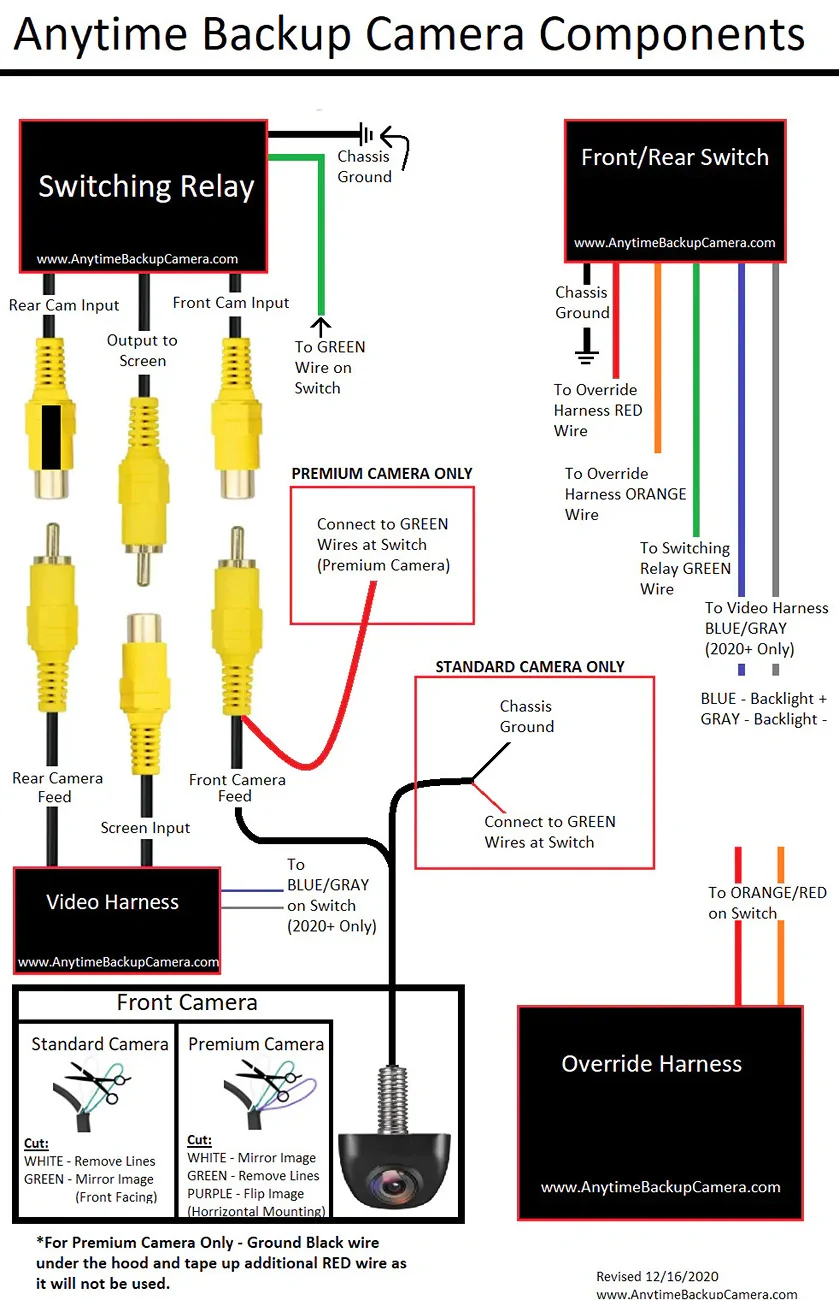
edit: ok maybe I'm just being a baby. Found this nice diagram for the overall wiring connections between the different parts. This part I didn't really need help with but it's nice. And found this connector layout drawing which is the one thing I did need, assuming it still applies. And assuming this is simply the back of the infotainment screen itself, then ok no problem.

Also there's a totally painless video how to get to the back of the head unit.

Karen mode off.


2025 4runner 6th gen Anyone tried this Anytime front bumper camera on SR5? head_unit_plugs


2025 4runner 6th gen Anyone tried this Anytime front bumper camera on SR5? Diagram_982x1520


2025 4runner 6th gen Anyone tried this Anytime front bumper camera on SR5? 20250912_204621705
 
Last edited:

brumey

SR5
Well-known member
Joined
Feb 1, 2025
Threads
44
Messages
651
Reaction score
338
Location
Tennessee USA
Vehicle(s)
F350
You will end up being the companies/Product tech support for the rest of us :)

Frankly, when a company pre-sales goes silent, I don'y buy from them, period. What if you had a post sales issue, I doubt they would respond to that either.
 
OP
OP

bkw777

SR5
Well-known member
First Name
Brian
Joined
Jul 31, 2025
Threads
12
Messages
184
Reaction score
91
Location
NJ
Vehicle(s)
25 SR5, 96 SR5
Part way into the job.

The head unit comes out easy as in the video.
The physical plugs all fit.

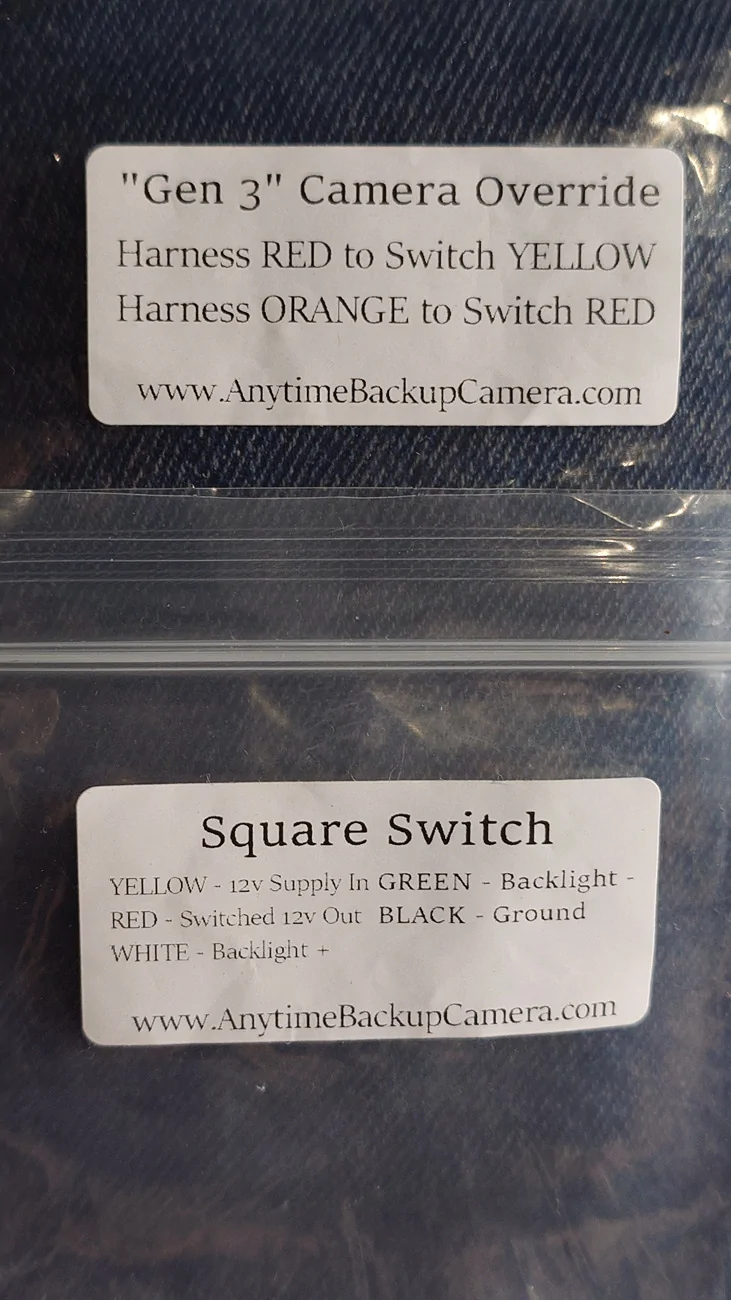
The "2024+ tacoma" kit works. All this gets you is it switches on the rear camera. The diagrams on line do not match the switch, but the bag the harness comes in has a printed label that says which color wires from the harness go to which wires on the switch. And the bag the switch comes in has it's own label describing the function of the rest of the wires. So you know which wires are just for the backlight, but no idea where to get a backlight power source from. The harness does not provide it. Maybe there is a fuse for it somewhere.

... looks like the video harness does provide a backlight power, so as long as you're getting that too, then there you go.

The video harness fits physically and all normal functions seem to still work with it connected (ie it doesn't seem to break anything at least) but it does not work to switch video sources. Even with all the RCA plugs disconnected, the backup camera still works.

This probably just means the video signal is on some other pin than it was in gen5. Hopefully I can find which pin IS the video signal, and just swap the position of 2 pins in the connector (the same way on both connectors on the video harness).

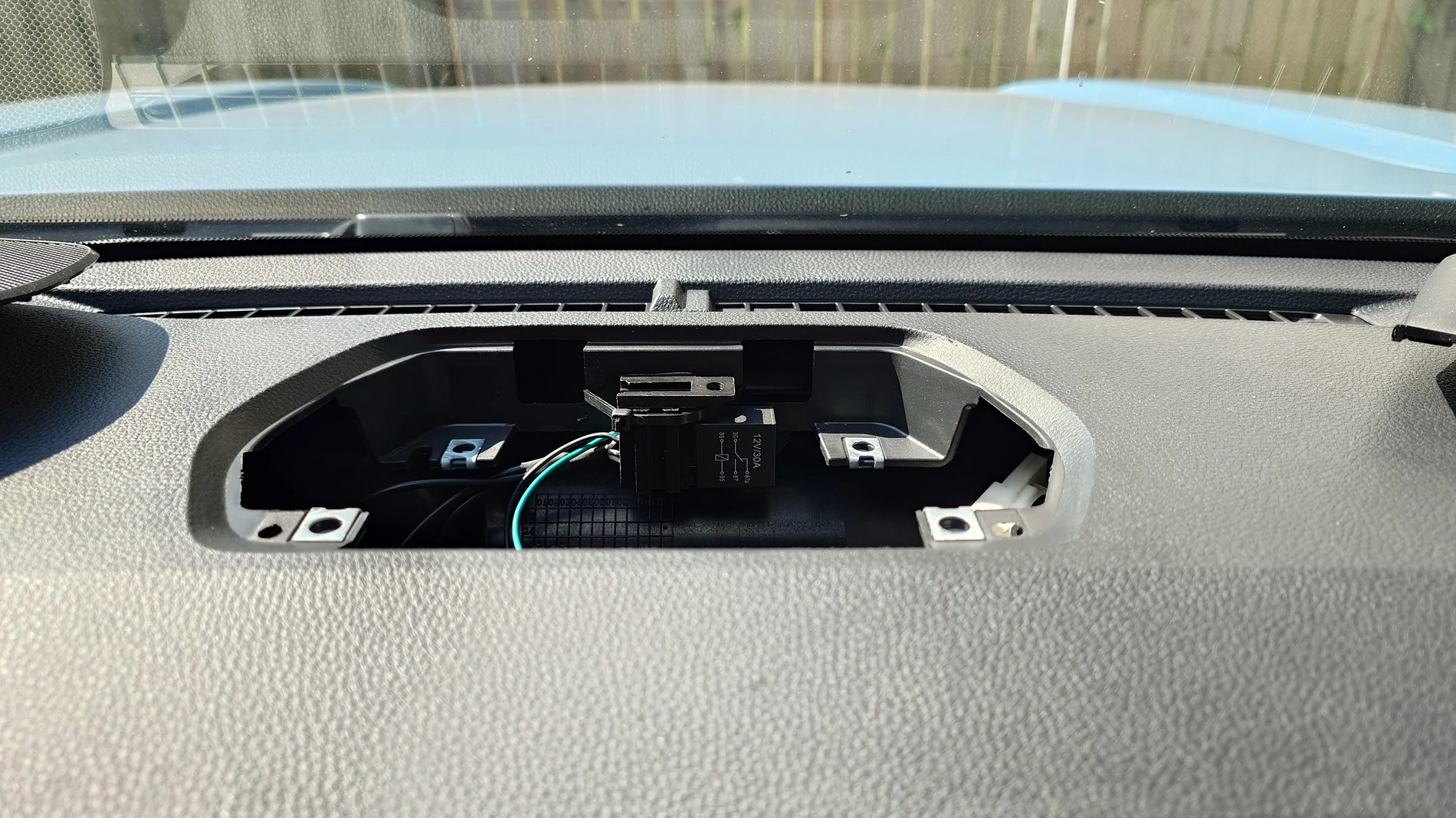
Since I don't have the jbl bluetooth speaker I found a convenient spot to mount the relay right under the blank cover. vhb and a zip tie. There is even still room to unplug the relay to replace it without taking anything apart if it ever craps out. The blank cover just pops up no problem.

2025 4runner 6th gen Anyone tried this Anytime front bumper camera on SR5? 20250912_104908259
 
Last edited:

mightysnopants

TRD Off-Road
Well-known member
Joined
Jul 4, 2025
Threads
6
Messages
76
Reaction score
51
Location
chicago
Vehicle(s)
6th Gen 4Runner TRD Offroad i-FORCE MAX
Part way into the job.

The head unit comes out easy as in the video.
The physical plugs all fit.

The "2024+ tacoma" kit works. All this gets you is it switches on the rear camera. The diagrams on line do not match the switch, but the bag the harness comes in has a printed label that says which color wires from the harness go to which wires on the switch. And the bag the switch comes in has it's own label describing the function of the rest of the wires. So you know which wires are just for the backlight, but no idea where to get a backlight power source from. The harness does not provide it. Maybe there is a fuse for it somewhere.

... looks like the video harness does provide a backlight power, so as long as you're getting that too, then there you go.

The video harness fits physically and all normal functions seem to still work with it connected (ie it doesn't seem to break anything at least) but it does not work to switch video sources. Even with all the RCA plugs disconnected, the backup camera still works.

This probably just means the video signal is on some other pin than it was in gen5. Hopefully I can find which pin IS the video signal, and just swap the position of 2 pins in the connector (the same way on both connectors on the video harness).

Since I don't have the jbl bluetooth speaker I found a convenient spot to mount the relay right under the blank cover. vhb and a zip tie. There is even still room to unplug the relay to replace it without taking anything apart if it ever craps out. The blank cover just pops up no problem.

20250912_104908259.webp
Do you have the 8 inch screen? Any pics of back of head unit? Thanks for leading the way.
 
OP
OP

bkw777

SR5
Well-known member
First Name
Brian
Joined
Jul 31, 2025
Threads
12
Messages
184
Reaction score
91
Location
NJ
Vehicle(s)
25 SR5, 96 SR5
sr5 8 inch
The drawing above with 3 connectors matches the back of the head unit. No new info from a pic.
but I'll post more pics when I'm done of course anyway.

I only just now managed to figure out a way to de-pin the 30-pin connector that has the video so I can start the trial & error pulling one pin at a time to find the one that breaks the video.

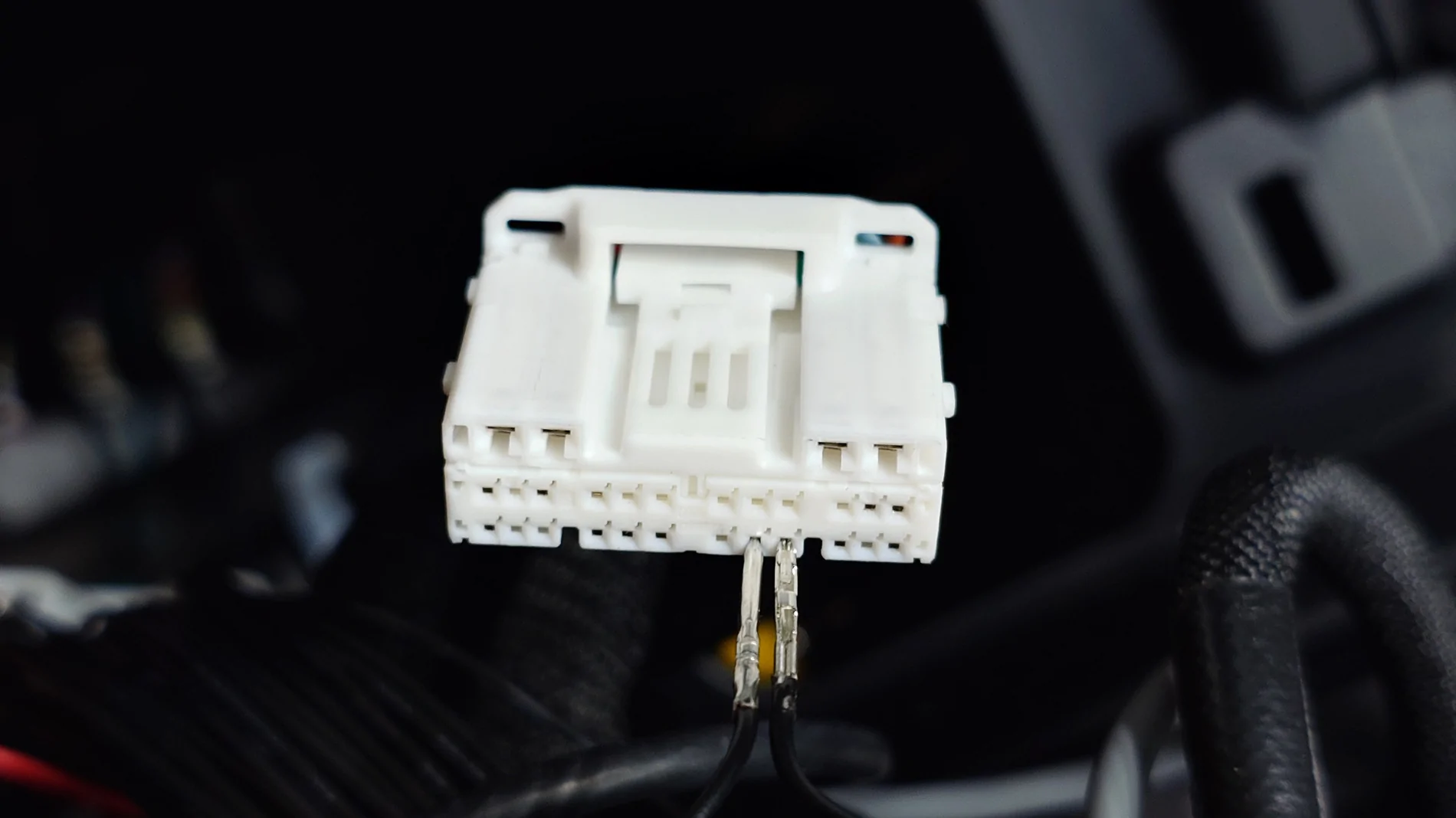
You just need a small paper clip with thin wire, and file or sand the end into a flat wedge like a screwdriver. The female connector has small square and longer rectangular holes. The small squares are the actual pins, the longer slots are the de-pin slots where you stick the paper clip and then turn it sideways.

Some pins are beligerant and won't come out but most do, sometimes with a little wiggling or turning back & forth, sometimes the pin only releases when you pull the paper clip out.

The ones that don't release, you can use needle nose pliars to force push the paper clip in beyond where it normally stops, and the pin comes out, but the retainer barb will be folded over the wrong way. You can use tweezers and straigten it back out if you're careful, but I bet you only get one single shot at that before it breaks off. The good news is, at least 15 pins are not used, no-connect from the car. So you can practice on most of those and munge some of them without worrying because they are all just extra. If you destroy one of the other pins that actually matters later, you have a good reservoire of spares.

So, practice on all the others before attempting to release the RCA wires, because you don't have any spares of those. (you could still recover from screwing up on of the rca wires, it just means you'd have to cut and solder wires)

On the male side, same thing. Every pin has a little slot next to it. You stick the paper clip in the slot (in the face with the pins not the back with the wires just to be clear). In my case for some reason the male pins all released much easier.

Anyway now I have the entire bottom row of wires removed and now I'll go try removing one pin at a time to find the video and hopefully the correct shield ground that actually goes with it. Then I'll be able to install the rca wires in the correct place and document it all with pics and diagram.
 
Last edited:
OP
OP

bkw777

SR5
Well-known member
First Name
Brian
Joined
Jul 31, 2025
Threads
12
Messages
184
Reaction score
91
Location
NJ
Vehicle(s)
25 SR5, 96 SR5
hah. The backup cam still works even with the entire 30-pin center cable un plugged. The video is nowhere in that connector. None of the pins on it seems to have the backlight power either, so the entire harness can be skipped.
 
OP
OP

bkw777

SR5
Well-known member
First Name
Brian
Joined
Jul 31, 2025
Threads
12
Messages
184
Reaction score
91
Location
NJ
Vehicle(s)
25 SR5, 96 SR5
28 pin connector on the left (the one that comes in the tacoma 2024+ anytime backup kit), see the drawing for the pin numbers, and remember that is looking at the radio, a mirror image of looking at the end of the female connector. Looking at the connector, pin 1 is top left.

pin 24 backlight - (left in pic)
pin 25 backlight + (right in pic)

The reason I think pin 24 is specifically backlight - and not just any regular gnd, is that if I supply constant power to white on the switch and only connect green to pin 24, the light goes out when I turn the headlights off.

2025 4runner 6th gen Anyone tried this Anytime front bumper camera on SR5? 20250912_214326974
 
Last edited:
OP
OP

bkw777

SR5
Well-known member
First Name
Brian
Joined
Jul 31, 2025
Threads
12
Messages
184
Reaction score
91
Location
NJ
Vehicle(s)
25 SR5, 96 SR5
I can't find any video on the 28 pin connector.

I made essentially a "video probe" by setting up a generic screen with power and one of the rca wires de-pinned from the video harness plugged in to the video input. The other end of the wire is the hair thin male pins from the connector. So I can just touch the center pin to a video signal and the screen lights up (the generic screen). I tested this with a generic backup camera, just touching the probe tip to the center pin from the camera, and it showed the camera view.

Then connected everything up with the anytime backup harness in place, truck running, infotainment on, and currently displaying the backup cam.

Then poked the probe in from the back side of one of the harness connectors to touch each wire while it's all live and the infotainment is actively showing the rear cam.

None of the pins made the generic screen show the scene, or react at all.

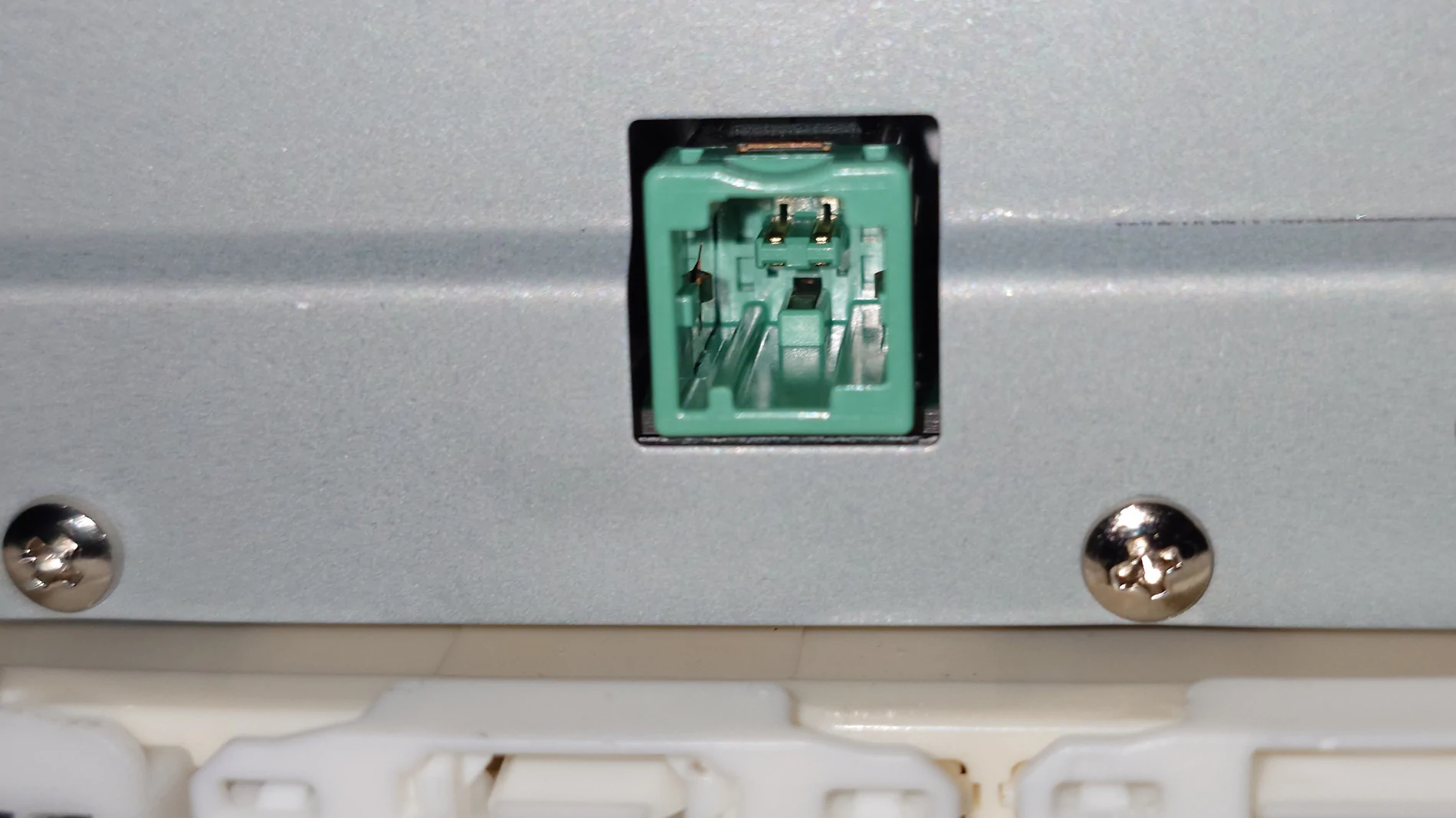
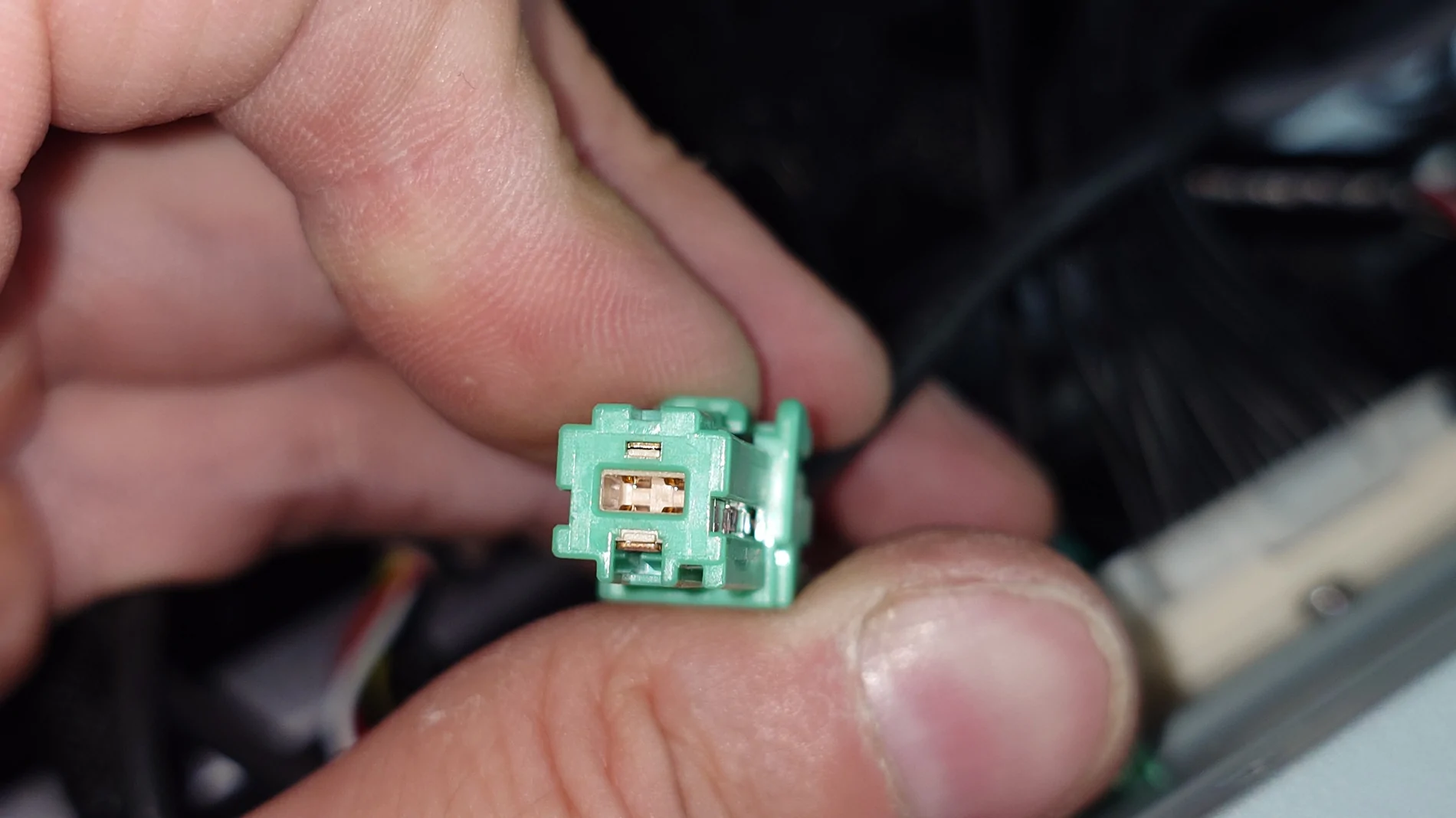
In fact totally unplugging entire connectors, none of the other plugs breaks the backup image either, except the 28-pin, but only because that shuts off the whole radio from loss of power, and the small green plug in the middle.

Unplugging the small green plug in the middle does make the screen go black while the radio stays on and otherwise working normally in every other way.

Further, with the green plug unplugged, switching the anytime backup switch on/off switches the infotainment back & forth between the normal driving display and the black screen.

Plugging the green plug back in/out while the screen is black makes the backup view come back, go back off.

So the green plug seems to be the video from the rear cam. Might also be the power to the rear cam.

Poking the probe into the green plug (the wire end, from the car) does not produce an image on the generic screen.

Looking at the green plug, it looks like it might be a digital connection like usb or spi instead of plain composite/ntsc.

Soooo I think this is a dead end for now until someone figures out what the video signal actually is.

This sucks. I don't want one of those rear view mirror screens, nor some janky overcomplicated extra android box that takes the place of my phone to connect to the car, and then you hook a usb or wifi cam to the android box...

The anytime backup part is working better than original, because now I transferred the blue & grey wires over from the video harness to pins 24 & 25 on the anytime backup harness, so my switch actually has a backlight that turns on/off and dims with all the other dash lights. But I have basically no use for that! I guess it might be some possible use to check up on a trailer while towing or something.

The video harness is not used at all (except to rob a couple wires from it to put into the other harness), just plug the cable from the car right into the radio like factory. The relay is not used either since there is no video signal to switch.

Tomorrow I'll diagram the updated anytime backup harness and all connections more clearly than this written mess.

2025 4runner 6th gen Anyone tried this Anytime front bumper camera on SR5? 20250912_224636010


2025 4runner 6th gen Anyone tried this Anytime front bumper camera on SR5? 20250912_224737158
Sponsored

 
Last edited:


Top